
You are here:
Migrate Billing Data to Revenue Management
If you were using your legacy system for billing and want to preserve the full billing history in Revenue Management, generate billing schedules and billing schedule groups for the previously billed periods in Revenue Management.
Before you use any of these methods to generate billing schedules and billing schedule groups, consider disabling existing downstream integrations or tax configurations in Revenue Management if they have already occurred in your previous systems.
This flowchart shows the different methods using which you can generate billing schedules and billing schedule groups for historical transactions in Revenue Management.
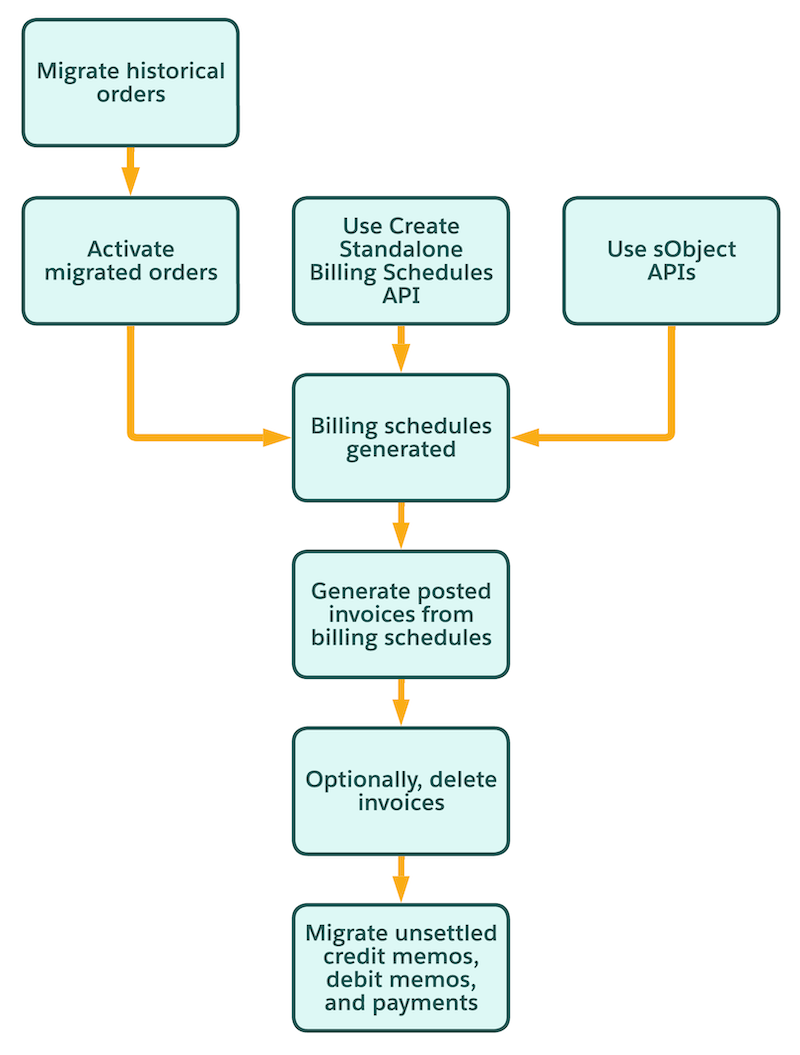
Method 1: Automate Generation from Historical Orders
Use this method to generate billing schedules and billing schedule groups automatically by migrating and activating orders from your legacy system.
- Migrate historical orders to Revenue Management.
-
To automatically generate billing schedules and billing schedule groups, activate these
types of migrated orders in the sequence they occurred.
- New-sale orders
- Amended orders
- Renewed orders
- Canceled orders
Activating orders in this chronology ensures accurate generation of billing schedules and billing schedule groups.
Method 2: Use Create Standalone Billing Schedules API
If you don't want to use orders, create billing schedules and billing schedule groups for historical transactions by using Create Standalone Billing Schedules API.
Method 3: Manually Generate by Using sObject APIs
If you don't want to use Create Standalone Billing Schedules API, manually create billing schedules and billing schedule groups by using sObject APIs. To get the required permissions for this process, contact Salesforce Support.
See Create a Record.
Manage Posted Invoices and Settlements
After you generate billing schedules and billing schedule groups, generate posted invoices and migrate any unsettled transactions.
-
To generate invoices from billing schedules and groups for historical periods, use Invoice Creation API and use the targetDate property to
specify the dates for previously billed periods.
Generating invoices prevents future invoice batch runs from processing these billing schedules.
- If you don't need these invoices, you can delete them.
- Optionally, use sObject APIs to migrate any credit memos, debit memos, or payments that haven't been settled in your previous system.
