A list group element filters items in a list based on the filter conditions and then
performs further operations on the filtered lists. A list operation is always the first step in
the list group and defines how items in the list are filtered.
When you create a list group, your first element, List Operation, defines how items in the list
are filtered. The rating elements added later within the list group
depend
on the conditions applied.
Example Create a List Group element and filter the base rate based on the consumption over the
base limit. For consumption over 100 units, give a 10% discount. Here’s how to configure your
list group element and rating procedure.
Ensure that you already created your rating procedure and configured rating settings.
Add the List Group rating element to the procedure.
In the list group, configure the list operation to filter consumption over 100 units.
Add a calculation step and calculate the updated base rate after applying the 10%
discount.
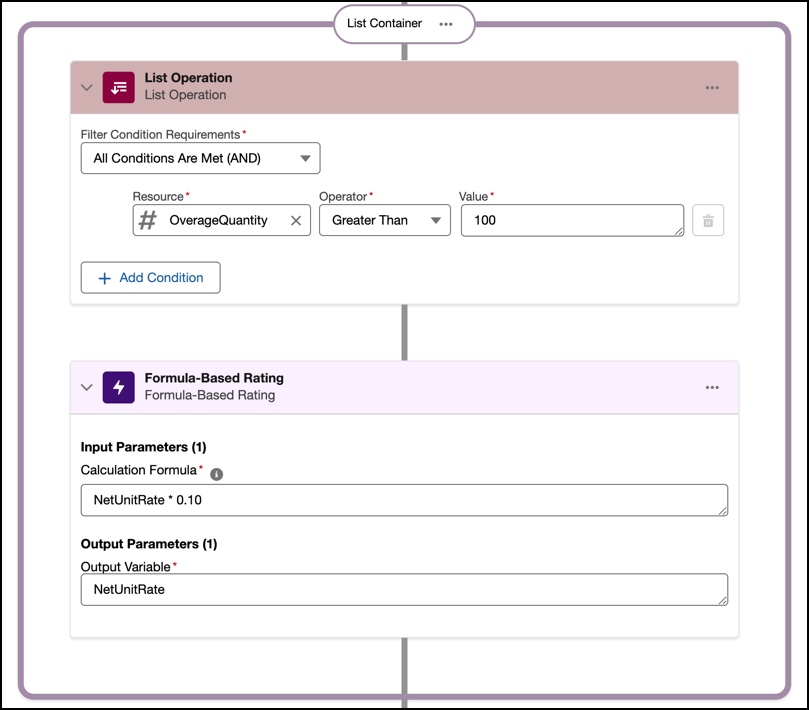
In this image, we see that the list operation applied has the condition that the overage
quantity must be greater than 100 units. When this condition is met, the rating procedure moves
to the Formula-Based Rating element to calculate the net unit rate for the usage
resource.
If a customer consumes fewer than 100 units of the usage resource, it doesn’t
meet the condition, and the rating procedure skips this step altogether. When a customer
consumes more than 100 units of usage resource, the procedure applies a discount of 10% to the
net unit rate.
Simulate and verify the data that’s queried. When you activate the rating
procedure, the Waterfall view shows every step of the rating calculation and the discounts
applied.
Did this article solve your issue?
Let us know so we can improve!
Loading
Salesforce Help | Article
Cookie Consent Manager
Cookie Consent Manager
General Information
Required Cookies
Functional Cookies
Advertising Cookies
General Information
We use three kinds of cookies on our websites: required, functional, and advertising. You can choose whether functional and advertising cookies apply. Click on the different cookie categories to find out more about each category and to change the default settings.
Privacy Statement
Required Cookies
Always Active
Required cookies are necessary for basic website functionality. Some examples include: session cookies needed to transmit the website, authentication cookies, and security cookies.
Functional Cookies
Functional cookies enhance functions, performance, and services on the website. Some examples include: cookies used to analyze site traffic, cookies used for market research, and cookies used to display advertising that is not directed to a particular individual.
Advertising Cookies
Advertising cookies track activity across websites in order to understand a viewer’s interests, and direct them specific marketing. Some examples include: cookies used for remarketing, or interest-based advertising.