
You are here:
Rounding Values
The Rounding Values element assists in precisely calculating the rate of a usage resource by using rounding rules.
Required Editions
| Available in: Lightning Experience |
| Available in: Enterprise, Unlimited, and Developer Editions with the Revenue Cloud Advanced license |

Important
- The Rounding Values element sets the rounding precision for an org that doesn’t have multicurrency enabled. When multicurrency is enabled, the org's settings determine the precision, and you can adjust decimal places for each currency through Manage Currencies in Setup. See Manage Multiple Currencies.
- The Rounding Values element determines the currency values for the outputs of preceding rating elements such as Manual Rate Discount and Volume-Based Rate Discount.
Here are the rounding rules.
- Round Up
- Apply this rule to round up the currency value of a resource to the nearest higher value. For example, if a storage unit costs US$1.7, use the round up rule to adjust the rate to $2.
- Round Down
- Apply this rule to round down the currency value of a resource to the nearest lower value. For example, if a storage unit costs $1.30, use the round down rule to adjust the rate to $1.
- Half Up
- Apply this rule to round up the currency value of a resource to the nearest number based on the decimal value. For example, if a storage unit costs $1.45 and you select the Half Up rule, the rate is adjusted to $1.5. However, if the storage unit costs $1.20, then the rate is adjusted to $1.
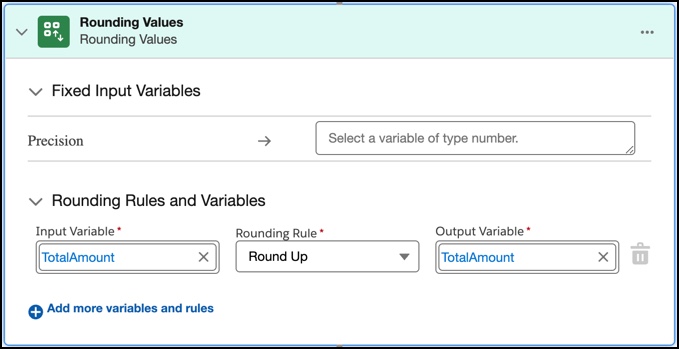
- Add the Rounding Values Element
Use the Rounding Values element to ensure that all rating elements added to the rating procedure work for different currencies in a single currency org.
Did this article solve your issue?
Let us know so we can improve!
