You are here:
View Review Status and Cancel Internal Review
Contract authors can check the review status and check whether all reviewer changes and comments are addressed.
| USER PERMISSIONS NEEDED | |
|---|---|
| To add the add-in to your Microsoft 365 Word: | Microsoft365WordUser |
| REQUIRED EDITIONS |
|---|
| Available in: Lightning Experience |
| Available in: Enterprise, Unlimited, Professional, and Developer Editions |
The contract author can modify, cancel, or add new reviewers during the review process.

Note When assigning or modifying user access, ensure the user isn't a member of any shared
groups with elevated permissions, such as Global Administrator or SharePoint Admin. Setting
a lower permission level like View only won't apply because their existing admin role
already grants full edit access to all documents in the folder.
- On the Microsoft 365 editor add-in, click View Review Status to view the review status of individual reviewers.
-
Review the status of each reviewer, and manage the reviewers.
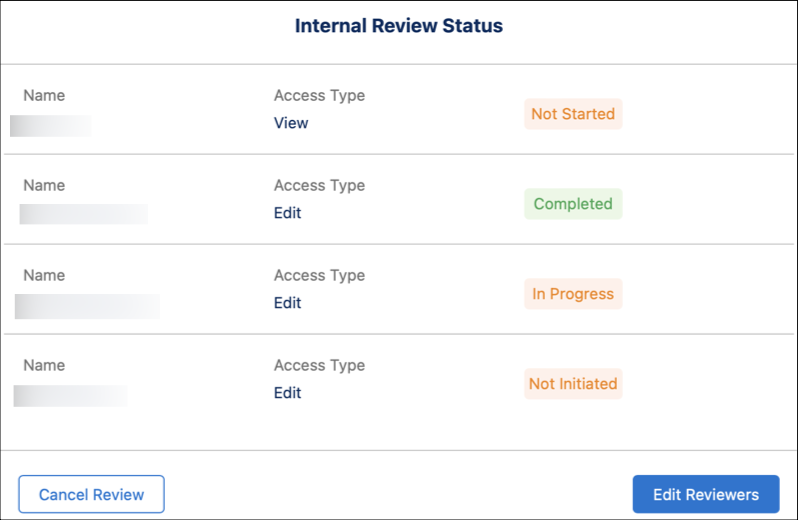 The contract author can click Edit Reviewers to edit the access type of reviewers. The contract author can also add and delete the reviewers.The contract author can click Cancel Review to cancel the review process, after which the reviewers have no access to the document.
 -
Verify that the review status of each reviewer is marked as completed and confirm that all changes and comments are addressed.
The contract author can check in the document at any state, and can decide when to do so, even if all comments were not resolved or reviewers did not mark the status as completed.
- After reviewing the comments and changes (sections, clauses, text) in the document, click Check In to complete the review process.
Did this article solve your issue?
Let us know so we can improve!
