You are here:
Contract Lifecycle Analytics for Contract Administrators
The Contract Lifecycle Analytics dashboard for contract administrators provides a comprehensive analysis of contracts based on status, completion time, renewal date, and clause to quickly identify the areas that need more attention.
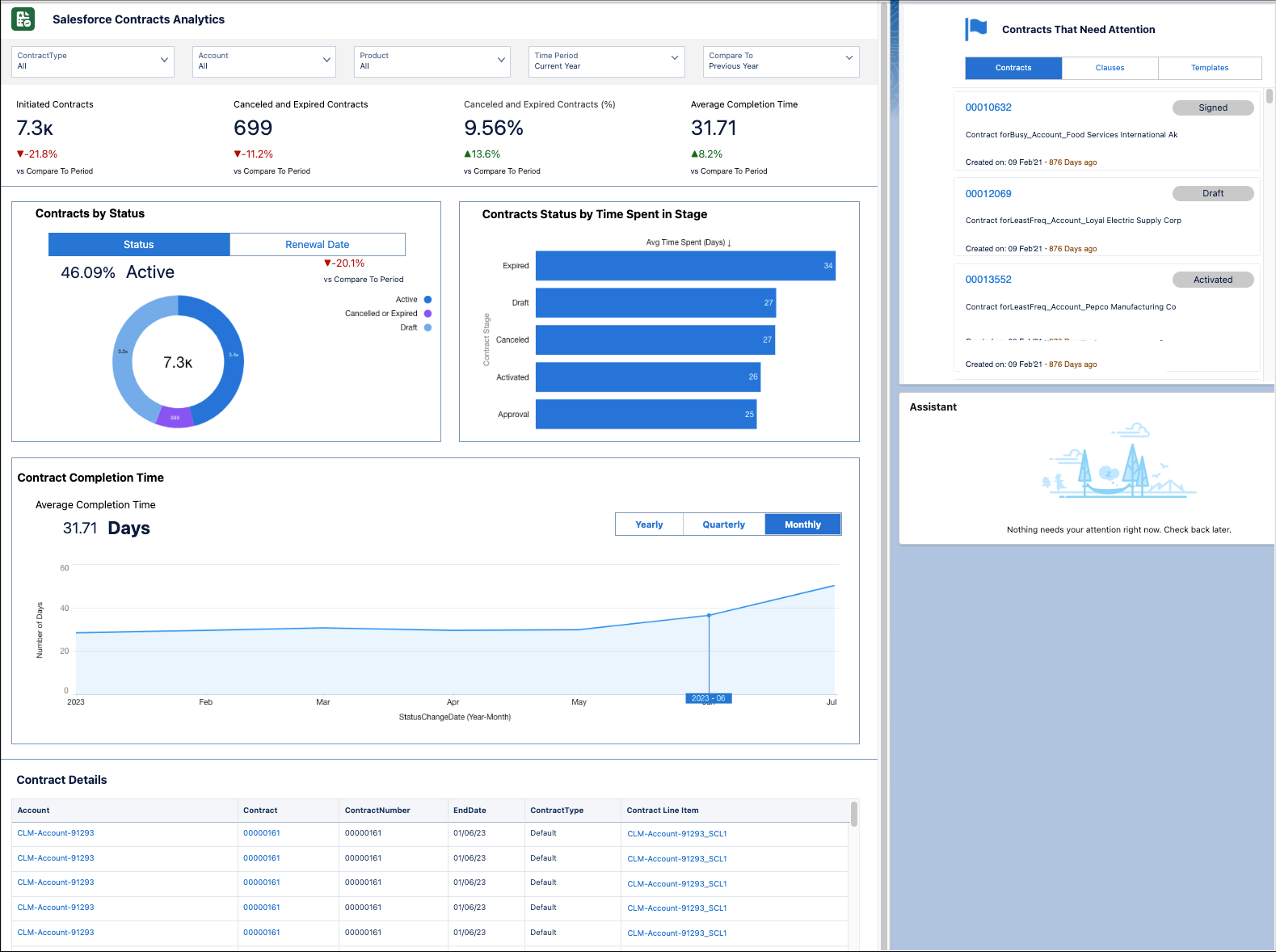
Filter contracts based on contract type, account, product, and duration and compare contract performance based on a selected period.
Use the metrics and charts in this dashboard to view this information:
-
The number of contracts initiated for a specific time and the difference compared to the duration selected in the Compare To field.
-
The value and percentage of contracts that are canceled and expired and the difference compared to the selected period.
-
The average completion time for the filtered contracts and the difference compared to the selected period.
-
The percentage and value of active contracts for different contract statuses.
-
The average completion time of contracts across all the filtered accounts.
-
The number of contracts that are due for renewal based on the days left before expiration.
-
The number of contracts with clauses and the distribution of clauses in each stage.
-
The overall contract completion trend based on the time scale, which can be monthly, quarterly, or yearly.
To know more about the KPIs used in the dashboard, see Key Performance Indicators in Salesforce Contracts Analytics.
