You are here:
Contract Status Picklist Values in Salesforce Contracts
The Contract Status picklist field drives the state model. The ContractManagement license adds default values to this field that map to the Object State Definition.
Default Values
Standard Salesforce orgs include three contract status values: Draft, In Approval Process, and Activated. When you enable the ContractManagement license, the system adds these additional values: Rejected, Negotiating, Awaiting Signature, Signature Declined, Signed, Canceled, Contract Expired, and Contract Terminated.
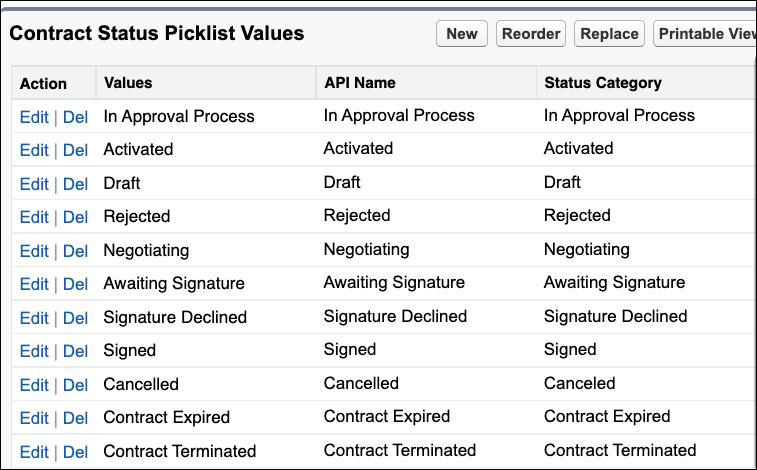
Managing the Picklist
Add custom picklist values and reorder existing values as needed.
Status values added by the ContractManagement license can't be deleted, even if you later disable the license.
Status category values can't be customized.
Don't rename default picklist values. Each value maps one-to-one to an Object State Value, and renaming breaks that mapping.
Reorder Contract Status
You can use the Reorder button to modify the sequence of the contract states.
- From Setup, click Object Manager.
- Type Contract in the Quick Find box.
- Click Contract and then click Fields & Relationships.
- Click Status and scroll to the Contract Status Picklist Values section.
- To reorder the picklist values:
- Click Reorder.
- Use the arrow keys to reorder the picklist values.Salesforce recommends the following order for contract states: Draft, In Approval Process, Rejected, Negotiating, Awaiting Signature, Signed, Signature Declined, Activated, Contract Expired, Contract Terminated, and Canceled.This change will reflect on the contract page.
- Save your changes.
