You are here:
Document Clause Lifecycle
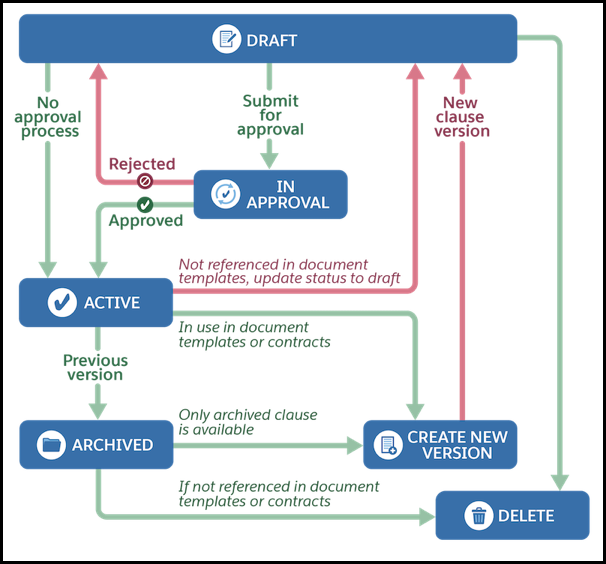
Each document clause lifecycle includes creation, activation, versioning, and archiving before deletion.
Before you create a main clause, you need to create a clause category. Once you have created a clause category, you create a document clause set.
-
The main clause is in the Draft stage during authoring. Once the clause is in draft state, it can be activated, updating its status to Active. Alternatively, it can be deleted which terminates its lifecycle.
-
If the approval process is configured, the clause is submitted for approval and the status changes to In Approval. If the clause is rejected, its status updates to Draft to re-draft the clause. If the clause is approved, it is marked as Active.
-
If the active contract is used in any document templates or contracts, a new clause version is created in the draft state and it follows the lifecycle as mentioned in above steps. The previous clause version becomes Archive once the new version’s status is updated to Active.
-
If an active clause is not referenced in any document templates or contracts, its status is updated to Draft and then delete the clause. Ensure all alternate clauses are deleted before deleting the last main clause version.
-
A clause in the archive state can be deleted if not referenced in any document templates or contracts. A new version of the last archive clause is created in the Draft state.
