You are here:
Draft Clauses with Contracts AI
Use Contracts AI to draft legal clauses based on input parameters or user prompts. Automate clause drafting to reduce manual research and enhance consistency in language and format.
For example, a contract designer can query for a force majeure clause, prompting Contracts AI to generate a clause. The designer can then save the clause as a draft. The designer can also draft alternative force majeure clauses tailored specifically for pandemic-related situations. Add these clauses to the clause library for future use in document templates.

Important Generative AI supports drafting clauses only in English.
| REQUIRED EDITIONS |
|---|
| Available in: Lightning Experience |
| Available in: Enterprise, Unlimited, Professional, and Developer Editions |
| USER PERMISSIONS NEEDED | |
|---|---|
| To create and edit document clauses | Contracts AI Clause Designer AND Contracts AI User AND Prompt Template User AND NLP Service AND Scoring Framework Admin |
| To add clauses to the clause library | Clause Designer User |
- From the App Launcher, find and select a Document Clause Set.
- Click Draft with Contracts AI.
- When you open Contracts AI, a disclaimer message for Einstein appears. Click Got it.
-
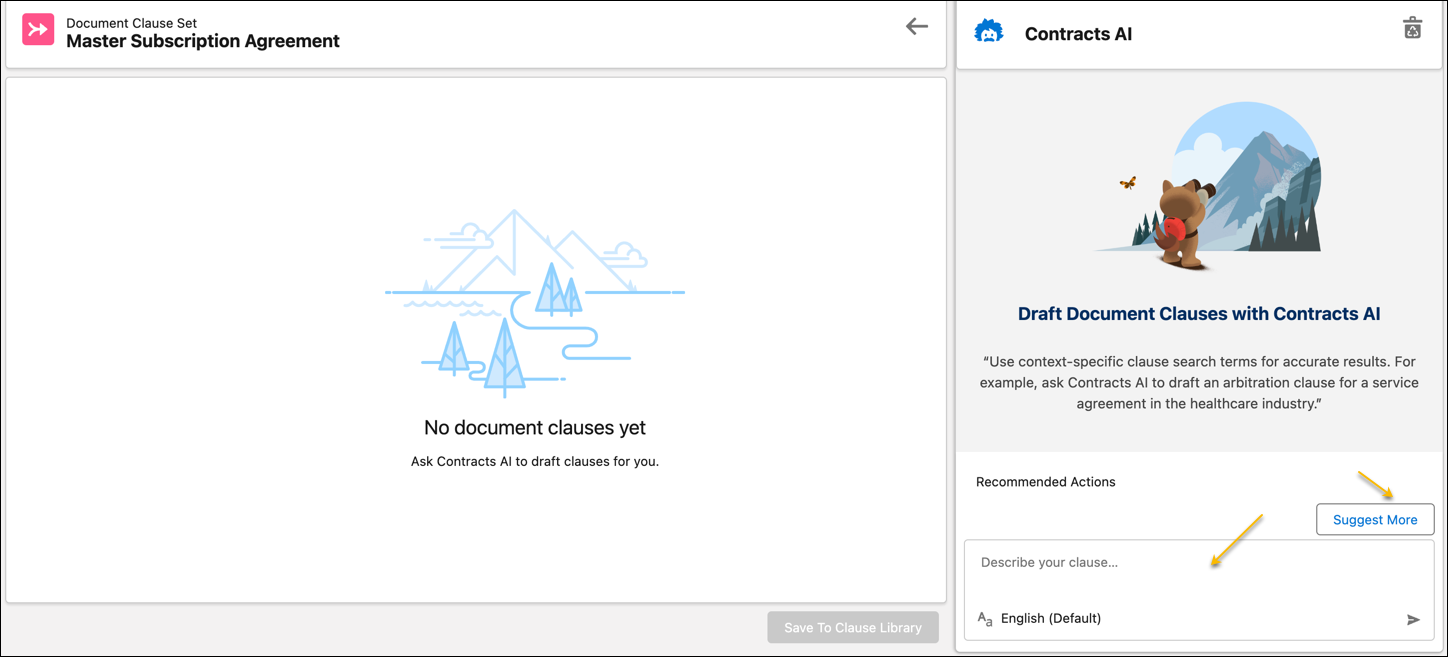
Enter a description for your clause.
Use context-specific clause search terms for accurate results. For example, ask Contracts AI to draft an arbitration clause for a service agreement in the healthcare industry.
-
To let generative AI draft the clause, press Enter.
You can draft clauses using the Suggest More feature.
Did this article solve your issue?
Let us know so we can improve!
