You are here:
Understand the Salesforce Contracts Lifecycle
Salesforce Contracts manages contracts through six lifecycle stages, from initial authoring through compliance. Each stage has features that help your team move contracts forward efficiently.
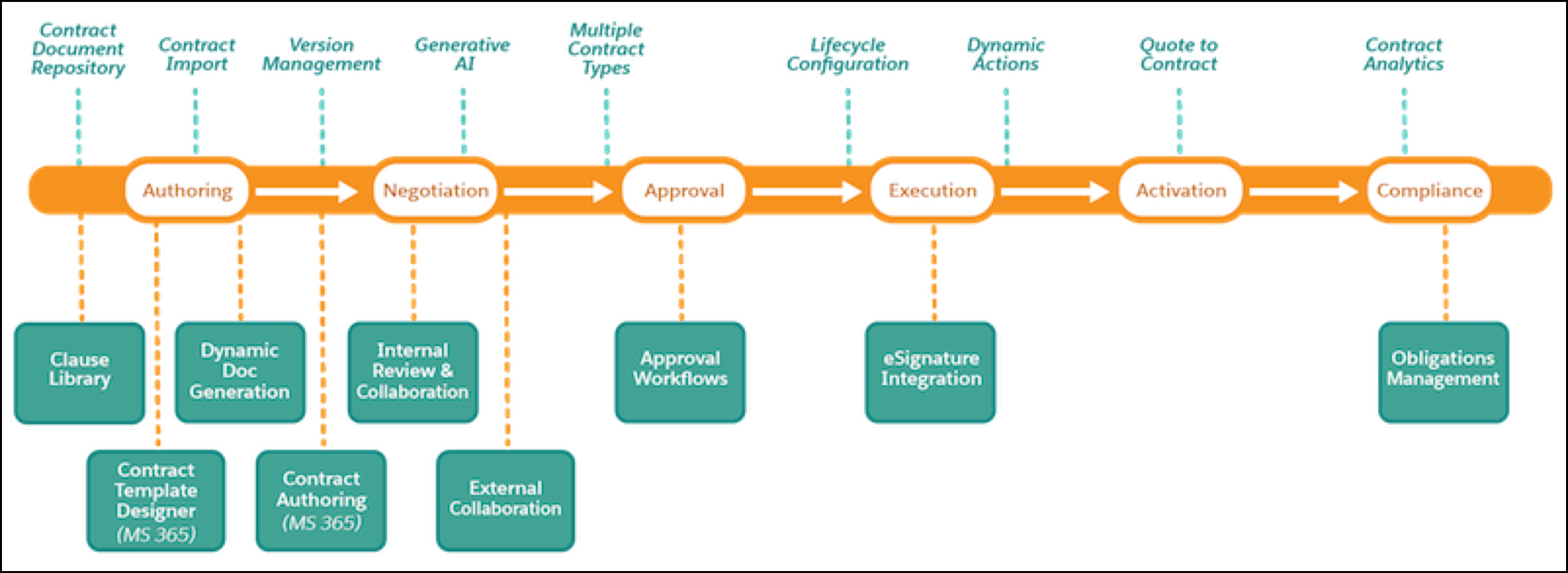
The following diagram shows the six stages of the contract lifecycle and the features available at each stage.
- Authoring
- Create contract documents using the Contract Template Designer with Microsoft 365, import existing documents, or generate documents dynamically. A clause library provides reusable, pre-approved language, and Generative AI can draft clauses automatically. A central document repository stores all contract documents with full version management.
- Negotiation
- Collaborate on contract terms with internal teams and external partners. Microsoft 365 integration supports real-time review and redlining directly in Word online. Contract authoring tools in Microsoft 365 let users edit and update contract language without leaving their familiar toolset.
- Approval
- Route contracts through configurable approval workflows. You can define multiple contract types, each with its own approval process, so different kinds of contracts follow the right review path.
- Execution
- Move approved contracts to signature using the built-in DocuSign e-signature integration. Lifecycle configuration and dynamic actions control which actions are available at each state, ensuring contracts follow the correct process through execution.
- Activation
- Activate executed contracts and create contracts directly from quotes, orders, or opportunities using the Quote to Contract feature. Context Service mappings automatically populate contract fields from the source record.
- Compliance
- Track contractual commitments using obligations management and monitor contract performance with Contract Analytics dashboards. Together, these features give teams visibility into compliance status and help identify risks before they become problems.
Did this article solve your issue?
Let us know so we can improve!
