You are here:
Lock Sections Within a Document
Template designers and contract authors can lock sections when they design the template and author the contract, respectively. Use the section lock feature to prevent unintended users from editing and deleting sections and their associated content, such as marked clauses and standard clauses. When an external or internal review is in progress, you can’t lock sections within that document.
Before you begin: Template designers and contract authors need specific permissions for section access control. Your admin can assign these permissions through a permission set. See Configure Section Access Control Permissions in Salesforce Contracts.
| REQUIRED EDITIONS |
|---|
| Available in: Lightning Experience |
| Available in: Professional, Enterprise, Unlimited, and Developer Editions |
| USER PERMISSIONS NEEDED | |
|---|---|
| To lock a section while designing a document template: | Microsoft 365 Word Designer AND DocGen Designer AND Clause User OR Clause Designer |
| To lock a section while authoring a contract document: | Microsoft 365 Word Designer AND CLM Admin OR CLM Runtime User AND DocGen Designer AND Clause User OR Clause Designer |
For example, in a product sales contract, you can lock the warranty section to make sure that the terms and conditions of the warranty remain unchanged. Locking makes sure that specific sections of your contract remain unchanged, even when multiple parties are involved in the drafting, reviewing, and redlining of the contract. The document generated from a template that has locked sections automatically inherits the lock at the document level.

- Open a contract document or document template in the Microsoft 365 editor.
- From the Home tab, open the Salesforce Contracts for Word add-in.
-
To lock a section, click
 and then click Edit Properties.
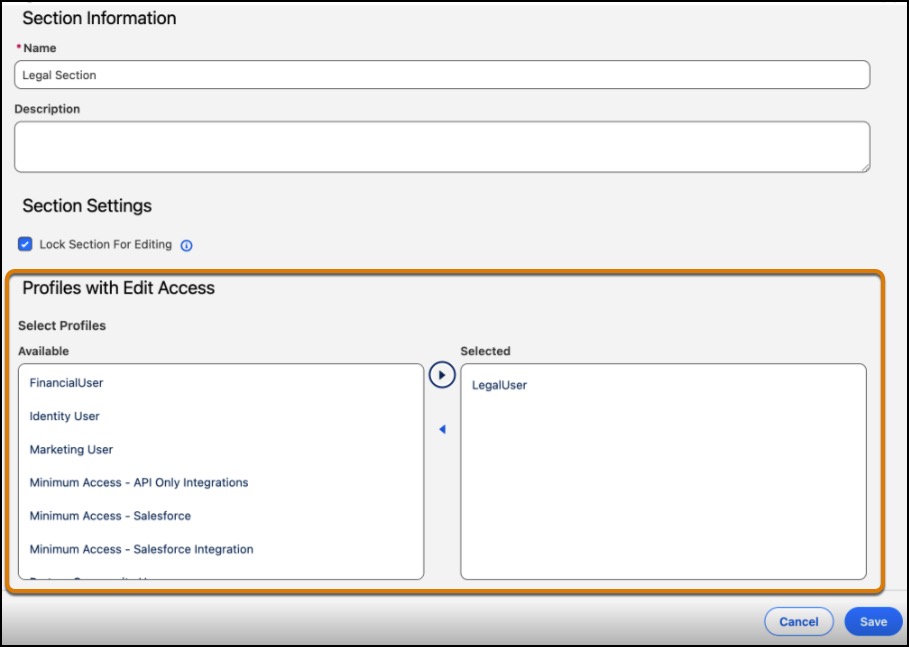
- Select Lock Section for Editing.
-
Select the profiles that you want to provide edit access from
Available and move them
Selected.
-
Save your changes.
When a section is locked, a lock symbol
 appears next to the section.
