You are here:
Mark as Clause
Contract authors can mark any modified clause or content within a contract document as a clause.
A contract author can select a modified clause or content within a document, mark it as a clause, and provide a unique name for it. After the clauses are marked and saved, the clauses appear on the document's tab, either within sections or as standalone clauses. The marked clause is mapped to a contract document for each version. The Contract Author or a Full access reviewer can edit, delete, and replace the clause with any other clause from the clause library.

Important Marked clauses are applicable only within the scope of a document and not available in the document clause library.
- Create New Contract Document Versions.
- Click the Salesforce Contracts for Word add-in on the Home tab.
-
Select the text on the document, and click Mark as
Clause.
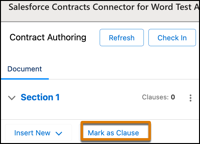 The edited clause will be marked as a clause only after the cursor moves out of the content control.
 - Enter the clause name.
- Click Mark as Clause.
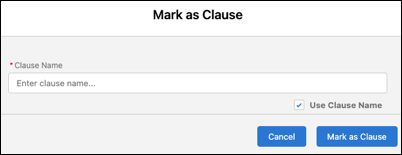
The clause appears in the add-in panel. Contract authors can quickly navigate to specific clauses within the document.
Did this article solve your issue?
Let us know so we can improve!
