Create a Named Credential for Salesforce Contracts Connector for Word Add-in Manually
Through Minimum Privilege Setup
Use a Named Credential with External Document Storage Configuration to ensure all
generated contract documents and templates are stored in a single, centralized Microsoft OneDrive
location without requiring elevated privileges. Only an Office 365 license needs to be assigned to
the integration user.
Available in: Professional, Enterprise, Unlimited, and
Developer Editions
User Permissions Needed
To create Named Credential:
CLM Admin User
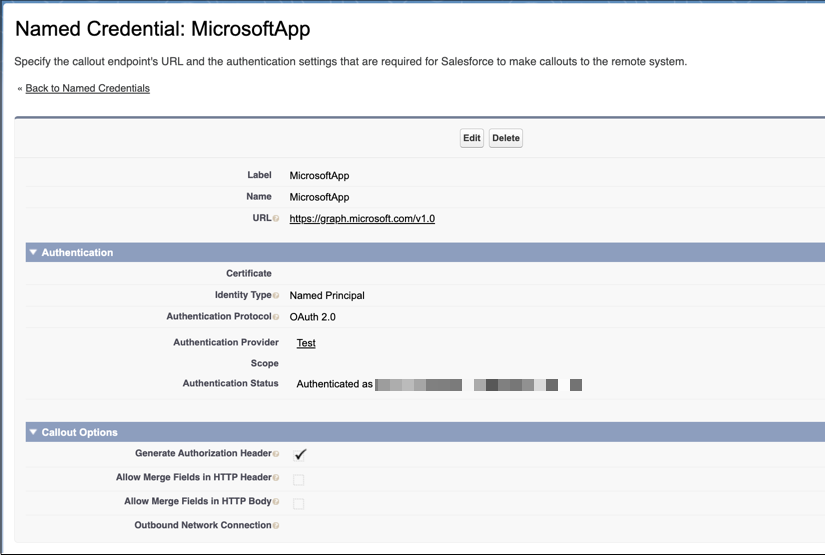
From Setup, in the Quick Find box, enter Named Credentials, and then select Named Credentials.
Click the dropdown next to New, and select New Legacy.
Enter MicrosoftApp as the label.
The Name field is automatically filled with MicrosoftApp.
Enter https://graph.microsoft.com/v1.0 as the URL.
Select Named Principal as the identity type.
Select OAuth 2.0 as the authentication protocol.
Select MicrosoftApp as the authentication provider.
Select the Auth.Provider you created while configuring the Auth Provider for Microsoft
App.
Select Start Authentication Flow on Save.
Make sure that Generate Authorization Header is selected.
Save your changes.
After the successful authentication of Microsoft Azure, the named credential's
authentication status changes to Authenticated.
Note If your Microsoft account is already authenticated in your current browser session, you
can successfully authenticate your named credential. If it isn't, authenticate your named
credential by using your Microsoft account credentials.
Verify that the named credential is authenticated correctly before proceeding further.
We use three kinds of cookies on our websites: required, functional, and advertising. You can choose whether functional and advertising cookies apply. Click on the different cookie categories to find out more about each category and to change the default settings.
Privacy Statement
Required Cookies
Always Active
Required cookies are necessary for basic website functionality. Some examples include: session cookies needed to transmit the website, authentication cookies, and security cookies.
Functional Cookies
Functional cookies enhance functions, performance, and services on the website. Some examples include: cookies used to analyze site traffic, cookies used for market research, and cookies used to display advertising that is not directed to a particular individual.
Advertising Cookies
Advertising cookies track activity across websites in order to understand a viewer’s interests, and direct them specific marketing. Some examples include: cookies used for remarketing, or interest-based advertising.