You are here:
Obligation Creation
The obligation manager can create an obligation from the Obligations object and then associate it with a contract, or create an obligation directly from the contract's record page. You can create obligations for a contract with any status; however, the obligation state remains as On Hold until the contract is in the status defined in the Activate Obligations Based on Contract Status config value.
Points to remember:
The start date and end date of the obligation must be after the start date of the contract.
The end date of the obligation can be after the contract end date.
The names of the obligations associated with a contract must be unique.
The default obligation state of a new obligation is On Hold.
Create an Obligation from the Obligations Object
The obligation manager can create an obligation from the Obligations object and then associate it with a contract. You can create obligations for a contract with any status; however, the obligation state remains as On Hold until the contract is in the status defined in the Activate Obligations Based on Contract Status config value.
| REQUIRED EDITIONS |
|---|
| Available in: Lightning Experience |
| Available in: Enterprise, Unlimited, Professional, and Developer Editions |
| USER PERMISSIONS NEEDED | |
To create an obligation: |
Obligation Manager permission set |
- From the App Launcher, find and select Obligations.
- Click New.
-
Enter these mandatory details:
-
Name: The name of the obligation.
-
Reference Object: The object associated with the obligation. For example, Contract.
-
Assignee: The assignee user associated with the obligation.
-
Party: The party who executes or delivers the obligation.
-
Status: The status of the obligation.
-
Start Date: The start date of the obligation.
-
- Save your changes.
Create an Obligation from the Contract Record Page
The obligation manager can create an obligation directly from the contract's record page. You can create obligations for a contract with any status; however, the obligation state remains as On Hold until the contract is in the status defined in the Activate Obligations Based on Contract Status config value.
| USER PERMISSIONS NEEDED | |
To create an obligation: |
Obligation Manager permission set |
| REQUIRED EDITIONS |
|---|
| Available in: Lightning Experience |
| Available in: Enterprise, Unlimited, Professional, and Developer Editions |
-
On the Contract record detail page, click the Obligations tab.
The page is blank when there are no obligations associated with the contract.
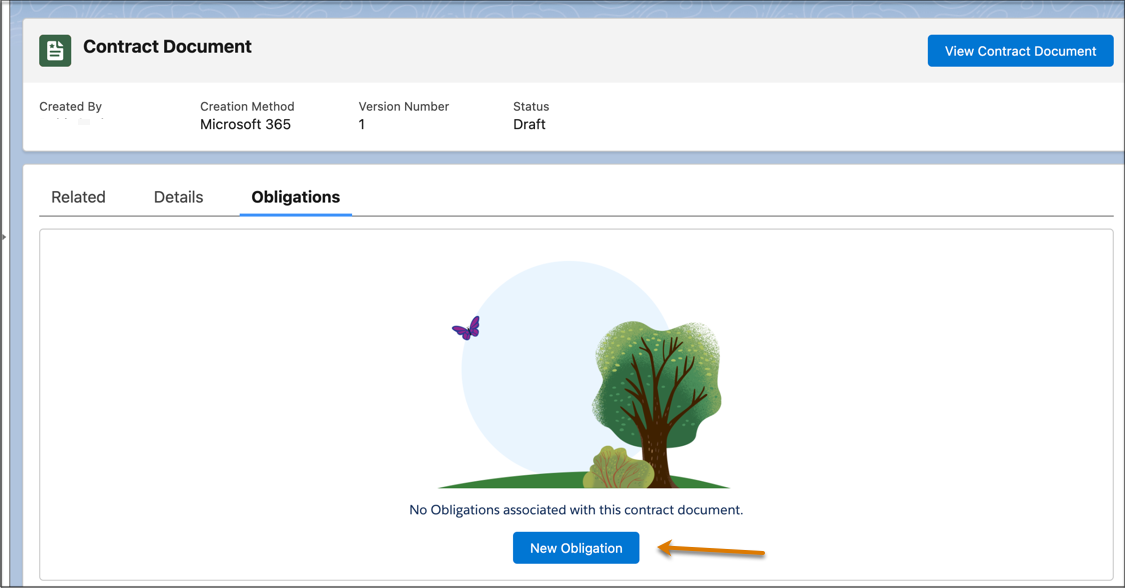
- Click New Obligation.
-
Enter these mandatory details:
-
Name: The name of the obligation.
-
Reference Object: The object associated with the obligation. For example, Contract.
-
Assignee: The assignee user associated with the obligation.
-
Party: The party who executes or delivers the obligation.
-
Status: The status of the obligation.
-
Start Date: The start date of the obligation.
-
- Save your changes.
