You are here:
Initiate Offline External Review
Contract authors can initiate an offline external review process from Salesforce.
| USER PERMISSIONS NEEDED | |
|---|---|
| To add the add-in to your Microsoft 365 Word: | Microsoft365WordUser |
| REQUIRED EDITIONS |
|---|
| Available in: Lightning Experience |
| Available in: Enterprise, Unlimited, Professional, and Developer Editions |
-
To download the contract document that you want to share with external reviewers, click Download for External Review.
The downloaded document doesn't contain internal review comments. You can manually email the document to the external reviewers. The external reviewer reviews the document, and shares it with the contract author.
-
To initiate the reconciliation process, select Initiate External Review from the Action dropdown.
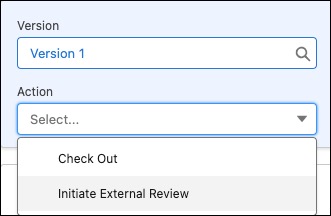
-
Select Import Third Party Document, and upload the document (DOCX) received from the external reviewer. Click the confirmation window to confirm upload, and click Check Out.
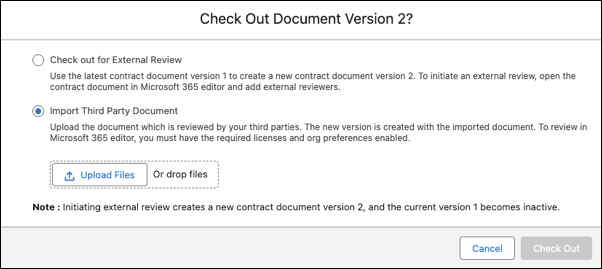 The contract document version is checked out and the Open in Microsoft 365 button becomes active.
 - Click Open in Microsoft 365 to open the document in Microsoft 365 editor.
- Review the document, and incorporate the feedback.
- Check in the final version of the document.
Did this article solve your issue?
Let us know so we can improve!
