You are here:
Redraft Extracted Clause
Clause designers can redraft the extracted clause content with generative AI, and then add the updated clause directly to the clause library.
| REQUIRED EDITIONS |
|---|
| Available in: Lightning Experience |
| Available in: Enterprise, Unlimited, Professional, and Developer Editions |
| USER PERMISSIONS NEEDED | |
|---|---|
| To create and edit document clauses | Contracts AI Clause Designer AND Contracts AI User AND Prompt Template User AND NLP Service AND Scoring Framework Admin |
| To add clauses to the clause library | Clause Designer User |
- Open the Extracted Contract Clauses tab.
-
Click
 to preview the clause content.
- Click Edit next to the clause that you want to modify.
-
Manually modify the clause details.
- Name: Enter a name for the clause.
- Format: Use the Rich Text or Non Formatted option to edit the clause content.
- Content: Edit the clause details.
-
Save your changes.
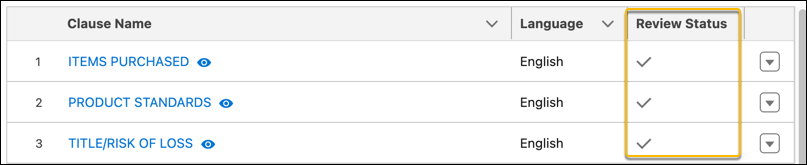 The clause review status on the Extract Contract Clauses is updated.
Did this article solve your issue?
Let us know so we can improve!
