You are here:
Search, Summarize, and Interact with Contracts Using AI
Use Contract Search with AI to query and analyze contract documents using natural language. You can view matching contracts, ask questions, summarize content, and preview or download contract documents.
Required Editions
| Available in: Lightning Experience |
| Available in: Enterprise, Unlimited, and Performance editions. |
| User Permissions Needed | |
|---|---|
| To use contract search: | CLM Runtime User AND Contracts AI User AND Prompt Template User |
- Click Search Contracts on the Contracts list page.
- Click Got it.
-
Enter your query in the Start your search box using natural
language.
Example: "Show me all contracts where the payment term is 30 days and there is protection against failure of delivery due to an upcoming storm in the state of California"
-
Press Enter to view the search results with matching contract segments.
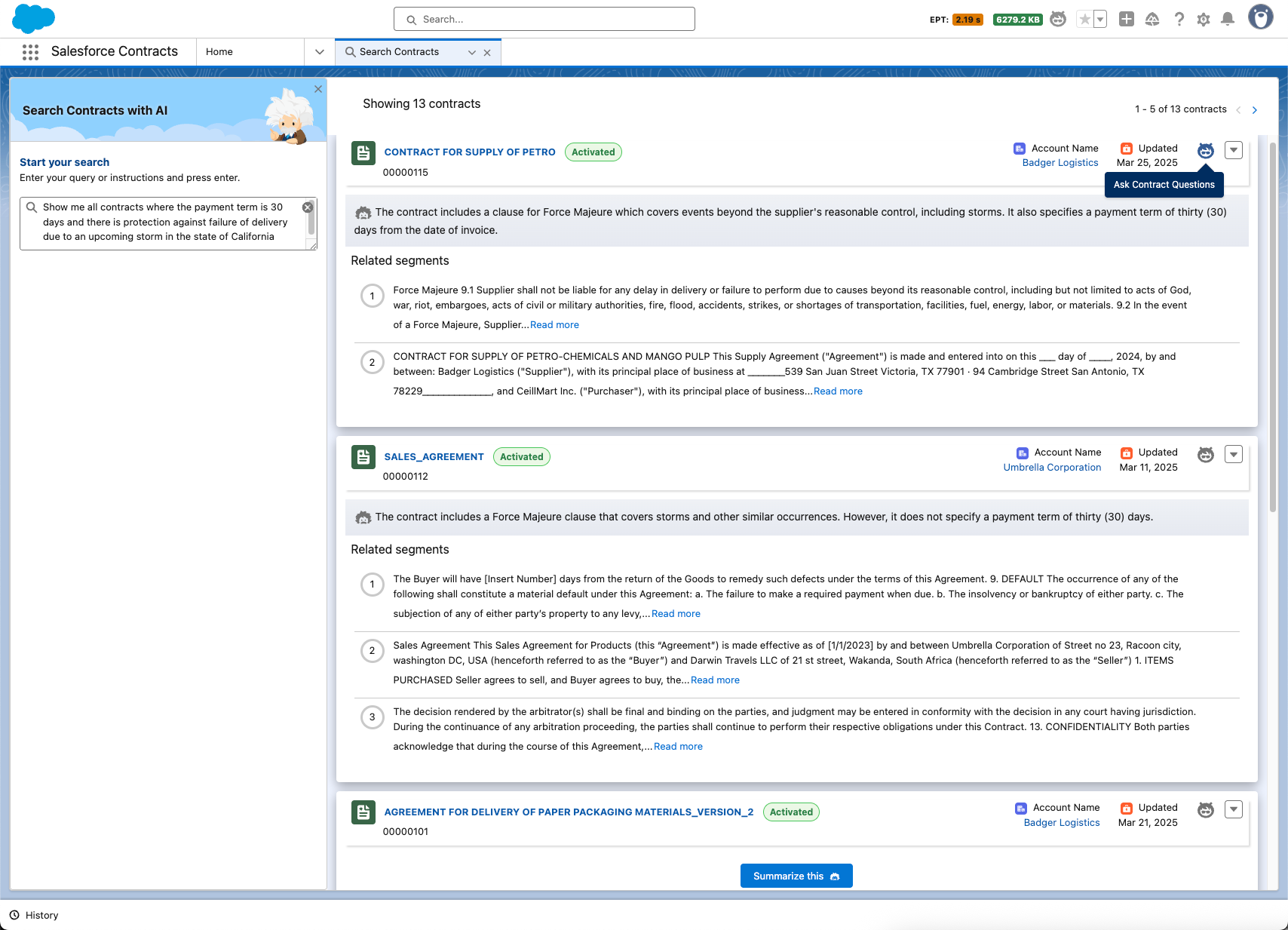
-
To generate a context-aware summary of the contract document, click Summarize
this. The summary is based on the context of your search query and highlights key
information from the document.
 Note The first two results are summarized automatically. You can see Summarize this only for the remaining results.
 -
To ask a question about a specific contract document, click Ask Contract
Questions. Enter your question in natural language to get AI-powered answers based
on the contract's content.
Note The Ask Contract Questions icon is visible if a contract agent is configured. See Set Up a Contract Agent.
-
To preview or download the contract document:
- Click the More Actions icon.
- Select Preview Document or Download Document.
Sample contract search queries:
- Show me all contracts with Cloud Kicks where the payment term is less than 30 days and there is protection against failure of delivery
- Pull up all agreements with Cloud Kicks where the delivery schedule is under 7 days and there are terms which protect against unforeseen circumstances
- Provide me the list of agreements with Cloud Kicks where there are no additional damages to be paid in lieu of any untoward incident
- Show me all contracts where the payment term is less than 30 days and there is protection against failure of delivery
- Pull up all agreements where the delivery schedule is under 7 days and there are terms which protect against unforeseen circumstances
- Provide me the list of agreements where there are no additional damages to be paid in lieu of any untoward incident
- Show me all contracts with Cloud Kicks where the payment term is less than 30 days and there is protection against failure of delivery due to an upcoming storm in the state of California
- Pull up all agreements with Cloud Kicks where the delivery schedule is under 7 days and there are terms that protect against unforeseen circumstances
- Sample Contract Queries and Follow-Up Questions for AI Interactions
Use the following examples to help you write effective natural-language prompts when using Contract Search with AI. These samples include queries that retrieve relevant contracts and follow-up questions you can ask to explore contract details. The AI maintains context across interactions, so you can continue asking questions without repeating information. - Use Case: Extract Key Terms from Contracts Using AI
As a Sales Representative reviewing an agreement with Cloud Kicks, use AI-powered contract tools to locate the MSA, extract renewal, pricing, and termination terms, ask clarifying questions, and share a summary with your team for internal alignment.
Did this article solve your issue?
Let us know so we can improve!
