You are here:
Update Contracts from Opportunity, Order, or Quote
Sync field changes from an opportunity, order, or quote to associated contracts by using the Update Contracts action. Only contracts in Draft status that were created with the Create Contract action are eligible for updates.
If you want to generate a contract document version along with the contract update you must configure a few contract type config settings. For more information, see Auto Generate Document On Update Creation. To update a contract from an opportunity, order, or quote:
Attention Note: Any contract associated with an object which wasn’t created using the Create Contract action button won’t be updated using the Update Contracts action button.
| USER PERMISSIONS NEEDED | |
|---|---|
| To create and update contracts from standard or custom objects: | CLM Runtime User OR CLM Digital Experience Partner User |
| REQUIRED EDITIONS |
|---|
| Available in: Lightning Experience |
| Available in: Enterprise, Unlimited, Professional, and Developer Editions |
- On the opportunity, order, or quote record page, click Update Contracts.
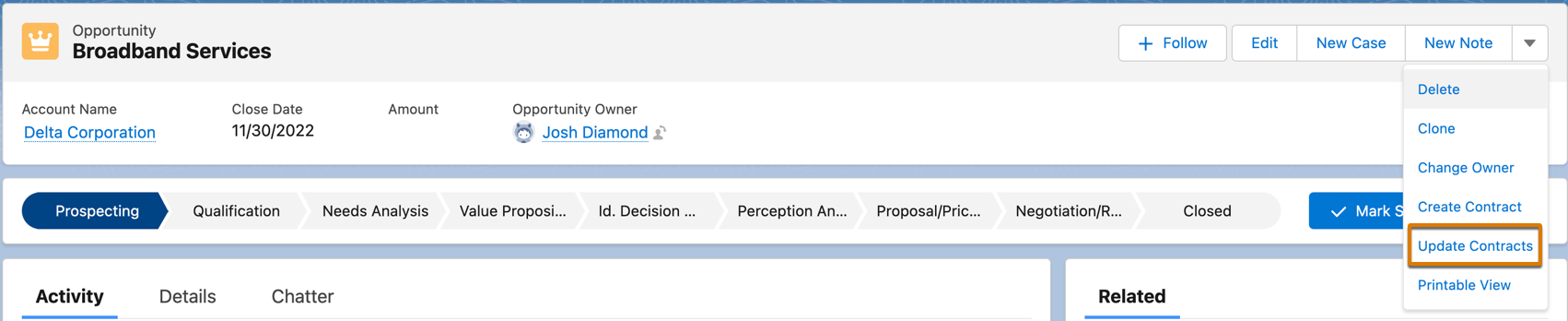
- The update contracts API fetches all the changes made to the object and updates the associated contracts that are in the draft status and were created using Create Contract action button.
Did this article solve your issue?
Let us know so we can improve!
