
Loading
Salesforce now sends email only from verified domains. Read More
Administer Health Cloud
Table of Contents
Select Filters

          No results
          No results
          Here are some search tips

          Check the spelling of your keywords.
          Use more general search terms.
          Select fewer filters to broaden your search.

          Search all of Salesforce Help
          Use Social Determinants to Assist Patients and Members

          Use Social Determinants to Assist Patients and Members

          Providing great care means having a comprehensive, holistic view of the people you’re managing—including insights into their social and environmental circumstances. If someone with health issues can’t drive to the grocery store or to medical appointments, it’s difficult for them to maintain or pursue optimal health. Health Cloud gives you tools to assess and record barriers to health and address them with interventions that make the difference between struggling and thriving.
          Required Editions

          Available in: Lightning Experience

          Available in: Enterprise and Unlimited Editions with Health Cloud or Life Sciences Cloud

          During a phone assessment, you discover that your patient or member, Charles Green, is having trouble managing his type 2 diabetes. He’s been missing medical appointments and says that he’s been eating a lot of fast food. As you dig a little deeper, you find that he doesn’t have adequate transportation to get to his doctor appointments or to a grocery store.

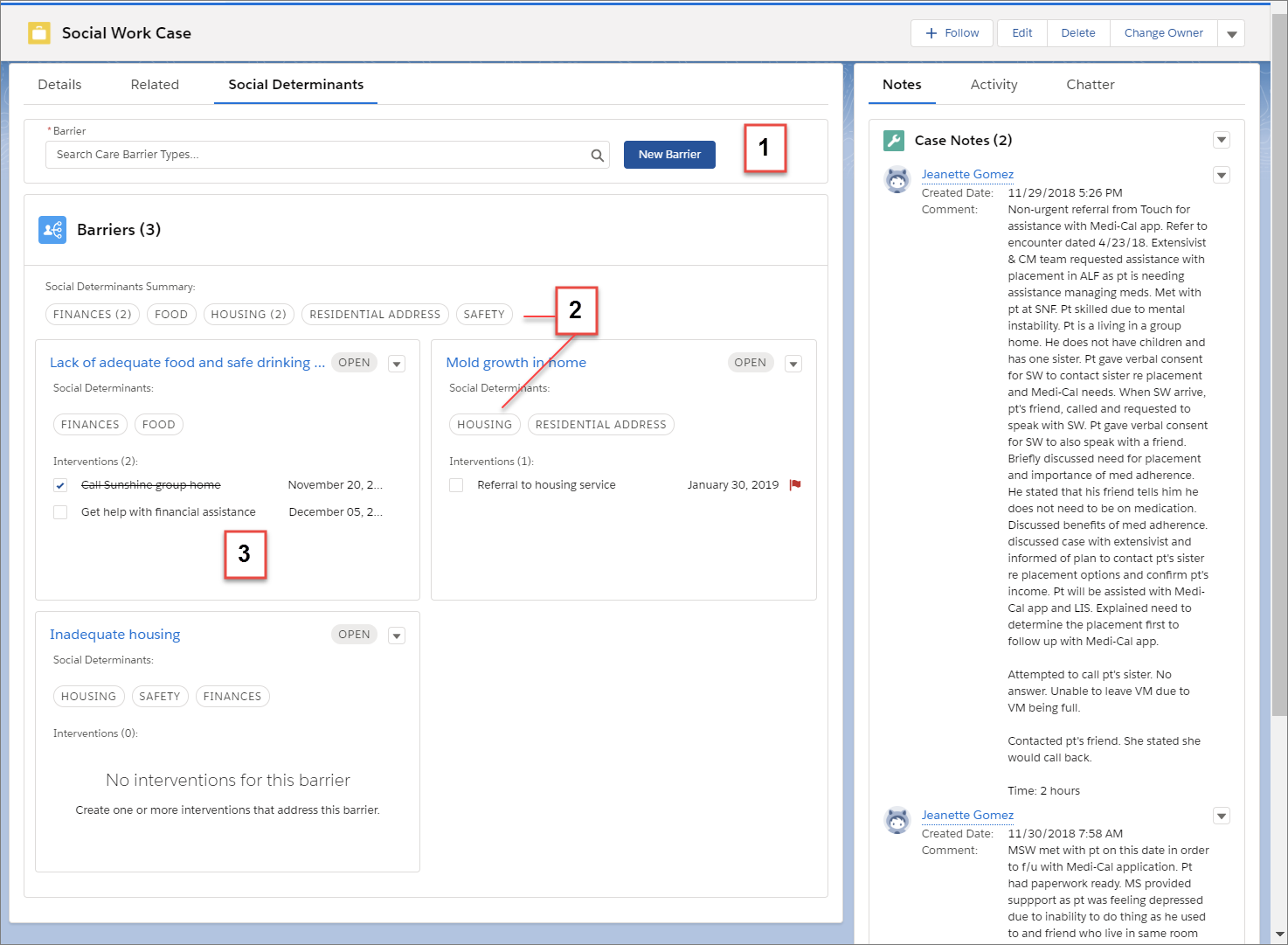
          Screenshot of the Care Barriers component with barriers, determinants, and intervention tasks.

          From a case or an account, you can capture important information about his circumstances and start addressing them right away.

          • Select barriers that describe his employment and transportation challenges (1).
          • Select the social determinants that are relevant to each barrier and view an aggregated list of determinants at the top of the card list (2).
          • Create and view tasks and other interventions that address the barrier (3).
          • Create a Barrier
            When you receive new information about a challenge that a patient or member faces, you capture the information in a barrier card. Within the barrier record, you can select the type of barrier you’re entering. Then, add important information such as the person’s name, the status and priority of the barrier, the related case, and the effective dates. Barriers appear in the component in the order you create them. So the newest barrier appears first.
          • Add Care Interventions to Address Barriers to Health
            An intervention is a task you create to address one or more aspects of the related barrier. For example, if someone can’t get to the grocery store, you can create a task to sign them up for a meal delivery service. You can assign the task to a person, and set a due date, status, and priority. Optionally, you can add a contact and relate the task to an account.
          • Stay on Top of Tasks with the Activity Timeline
            Track the intervention tasks that are related to barriers in the activity timeline.
           
          Loading
          Salesforce Help | Article