
Loading
Visual Studio Code Based Modeler for Consumer Goods Cloud
Table of Contents
Select Filters

          No results
          No results
          Here are some search tips

          Check the spelling of your keywords.
          Use more general search terms.
          Select fewer filters to broaden your search.

          Search all of Salesforce Help
          Third-Party App Launch Button

          Third-Party App Launch Button

          Create buttons on the display record pages of the Consumer Goods offline mobile app to open third-party apps. When sales reps open other apps along with the CG offline mobile app on their mobile device, they can handle multiple business processes simultaneously. This capability improves their productivity and efficiency. Create business logic methods to determine the button’s visibility and to ensure that you open the desired app. Create an event handler for the button click event and test the results on a mobile device.
          Required Editions

          Available in: Professional, Enterprise, and Unlimited Editions that have Consumer Goods Cloud enabled

          Salesforce developers implement communication with other allowlisted apps through deep links. You can pass relevant parameters from the Consumer Goods offline mobile app to other third-party apps by using deep links. The third-party apps use the data for the downstream process. Some backend processes are triggered when a sales rep taps a button to open third-party apps from the Consumer Goods offline mobile app.

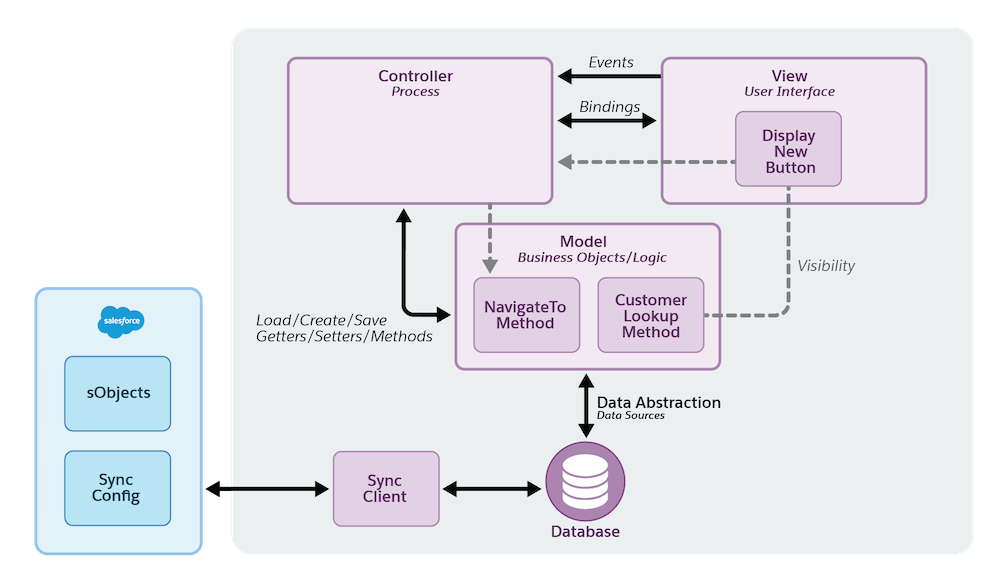
          The backend processes that occur when a sales rep taps a button on the Consumer Goods offline mobile app to open a third-party app.

          View

          The new button creates an event that ensures sales reps view the button on the app UI. The display process handles the event and the event’s visibility is bound to a business object method.

          Controller

          The controller handles the button event and calls the method to open the third-party app.

          Model

          The model determines if an account is specified and invokes the framework method to open the third-party app.

          • Add a Button to Launch Google Maps
            Create a button on the Display Detail screen in the Consumer Goods offline mobile app to open Google Maps.
          • Configure Button Visibility Settings
            In the Consumer Goods Cloud offline mobile app, create a business logic method to display the button that launches the third-party app. This method ensures that sales reps can view the button on the UI when they log in to the app.
          • Add a Method to Launch Google Maps
            In your Consumer Goods Modeler workspace, add a method to the Display module to launch a third-party app from the Consumer Goods offline mobile app. Sales reps can tap the maps app launch button in CG offline mobile app to launch apps such as Google Maps. Customize the business logic method to pass the latitude and longitude parameters, so that sales reps navigate to the correct coordinates.
          • Configure the Launch Button Click Event
            In the Modeler workspace, create an event handler to handle the maps app launch button click event. The Google Maps app opens when a sales rep taps the launch button on a product display record page in the Consumer Goods Cloud offline mobile app. This UI action is known as an event.
          • Test the Maps App Launch Button
            Test the button to open third-party apps on a mobile device. Check if Google Maps opens and shows the navigation to the customer’s location when you click the button in Consumer Goods Cloud offline mobile app.
           
          Loading
          Salesforce Help | Article