Loading
Prepare for Email to Become the Default Login ExperienceRead More
Set Up and Maintain Your Salesforce Organization
Salesforce Classic Doesn’t Go Away When You Move Users to Lightning Experience

Salesforce Classic Doesn’t Go Away When You Move Users to Lightning Experience

Saying hello to Lightning Experience doesn’t mean saying goodbye to Salesforce Classic. You and your users can easily move between the new and classic interfaces as needed. So even if Lightning Experience isn’t a perfect fit yet, there’s no risk in rolling it out. Some occasional switching is worth getting the productivity benefits from the new experience.
Required Editions

Available in: Group, Professional, Enterprise, Performance, Unlimited, and Developer Editions

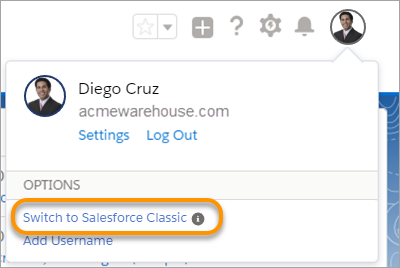
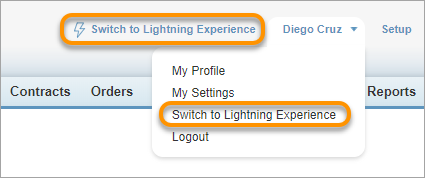
In case users need access to a feature or tool that’s still back in the classic interface, we provide the Switcher. All users who have access to Lightning Experience automatically get the Switcher. Which they can use to...wait for it...switch between Lightning Experience and Salesforce Classic anytime they need.

  • In the Lightning Experience header, click the profile picture and select Switch to Salesforce Classic.
    Switcher to Salesforce Classic
  • In the Salesforce Classic header, click Switch to Lightning Experience. (The Switcher link is also available from a user’s profile menu.)
    Switcher to Lightning Experience

    When switching out of Salesforce Classic, a user lands on the same page in Lightning Experience, if it exists. If the same page isn’t available in Lightning Experience, the user sees their default landing page instead.

Each time a user switches to Lightning Experience or Salesforce Classic, that interface becomes the user’s default interface.

 
Loading
Salesforce Help | Article
