You are here:
Send Images and Files in Messaging Sessions
Sometimes, only a picture will do. Resolve customer inquiries faster by sending images and files during messaging sessions in Agentforce Service (formerly Service Cloud).
Required Editions
| View supported editions. | |
 This article applies to:
|
Enhanced In-App Chat, Enhanced Web Chat v1, Enhanced Web Chat v2, Enhanced WhatsApp, Enhanced Facebook Messenger, Standard and Enhanced SMS, Enhanced Apple Messages for Business, Enhanced LINE, and Bring Your Own Channel |
| User Permissions Needed | |
|---|---|
| To send and receive messages in Enhanced Chat: | Enhanced Chat User permission set license AND Enhanced Chat Rep user permission |
| To send and receive messages in standard and enhanced messaging channels: | Messaging Agent |
Supported file types and maximum attachment size vary depending on the channel type.
| Channel Type | Maximum File Size | Supported File Types |
|---|---|---|
| Enhanced Chat | 5 MB |
Outbound: .bmp, .csv, .doc, .docx, .gif, .jpg, .jpeg, .pdf, .png, .tiff, .txt, .xls, .xlsx, and .xml |
| WhatsApp (Enhanced) | Varies by file type. | .jpeg, .png., .pdf, .txt, .ppt, .pptx, .pps, .ppsx, .doc, .docx, .xls, .xlsx, .csv., .json, .xml, .rtf, .aac, .amr., .mp4, .3gp Inbound only: .mp3, .ogg, .mpeg |
| Facebook Messenger (Enhanced) | 25 MB | .jpg, .jpeg, png, .bmp, .tiff, .webp, .txt, .pdf, .psd, .rtf, .xls, .xml, .exe, .zip, .mp3, .mov, .mp4, .3gp, .gif |
| Apple Messages for Business (Enhanced) | 100 MB | .png, .jpg, .jpeg, .bmp, .tiff, .txt, .pdf, .psd, .rtf, .xls, .xlsx, .doc, .docx, .ppt, .json, .pptx, .pps, .ppsx, .csv, .xml, .pkpass, .ics, .exe, .zip, .usdz, .mp3, .caf, .mov, .mp4, .3gp, .gif |
| LINE (Enhanced) | Varies by file type. For details, see Considerations for LINE Messaging Channels. | .png, .jpeg, .mpf, .m4a |
| Bring Your Own Channel | 25 MB | .png, .jpg, .jpeg, .bmp, .tiff, .gif, .txt, .pdf, .psd, .rtf, .xls, .xlsx, .doc, .docx, .ppt, .pptx, .json, .pps, .ppsx, .csv, .xml, .mov, .mp4, .3gp, .3g2, .mpg, .mp3, .caf, .m4a, .exe, .zip, .ics, .pkpass, .usdz |
| SMS long codes (Standard and enhanced) |
|
.jpg, .jpeg, .png, .gif |
| SMS toll-free long codes (Standard and enhanced) | 525 KB | .jpg, .jpeg, .png, .gif |
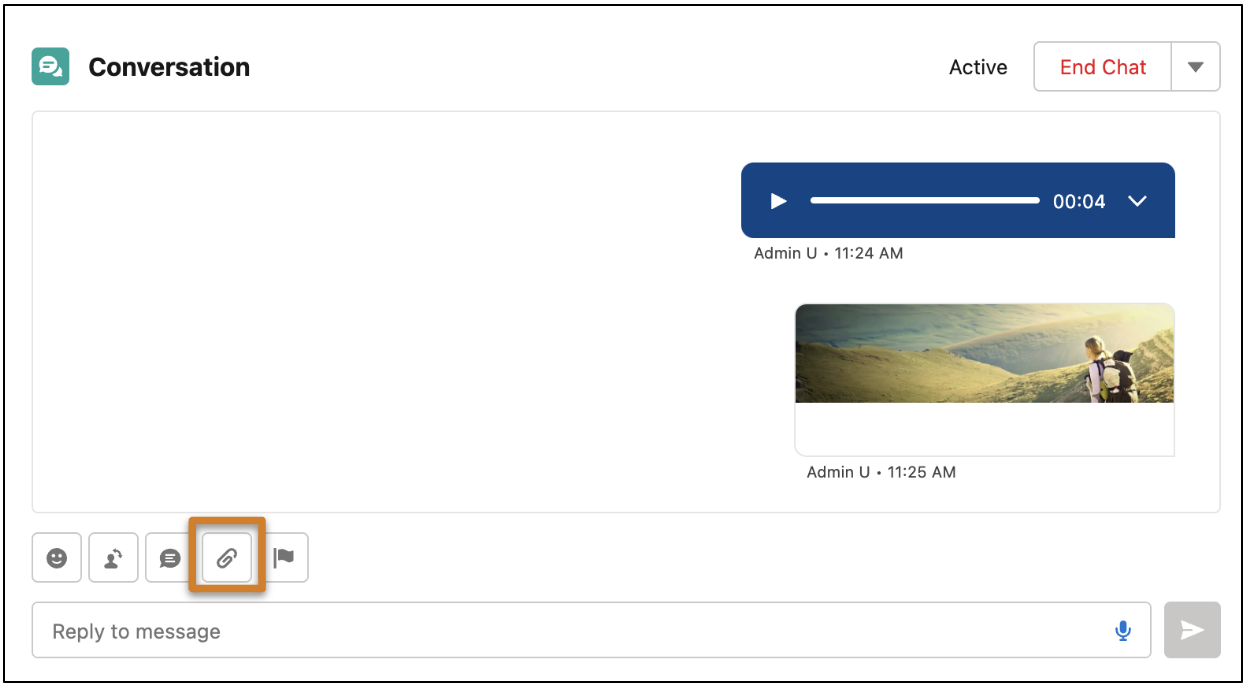
- Click the paperclip icon in the messaging window.
- Select the image or file that you want to send. You can send only one file at a time.
- If your file is a public link, optionally create an expiration date for it.
- Click the send icon.

Note
- In standard channels, service reps can’t send text and a file in the same message.
- Images and file attachments sent over SMS long code channels are supported only for US and Canadian numbers associated with Salesforce North American instances. View your instance on the Company Information page in Setup. SMS short code channels don’t support images and file attachments.
- In enhanced channels excluding LINE and WhatsApp, reps can receive GIFs but not send them. LINE and WhatsApp don't support GIFs.
- In enhanced Facebook Messenger channels, file attachments are sent with randomly generated file names rather than the original file name.
- In enhanced channels, if customers attach multiple files to one message, the rep may not receive the message. If this occurs, the customer can try sending one attachment per message.
- To let customers view previews of asset files sent by bots or reps, first add the Salesforce CRM Content User feature license to your org, then to the users who send files. To let bots and reps share files in enhanced channels and Enhanced Chat, enable file sharing for enhanced Messaging channels.
- Enable File Sharing for Enhanced Messaging Channels
To let service reps and bots share files with customers in enhanced Messaging channels and Enhanced Chat, configure your content delivery settings. - Enable Public Linking on an Asset File
To let customers view previews of asset files sent by service reps or bots, enable public link capability on the file.
Did this article solve your issue?
Let us know so we can improve!
