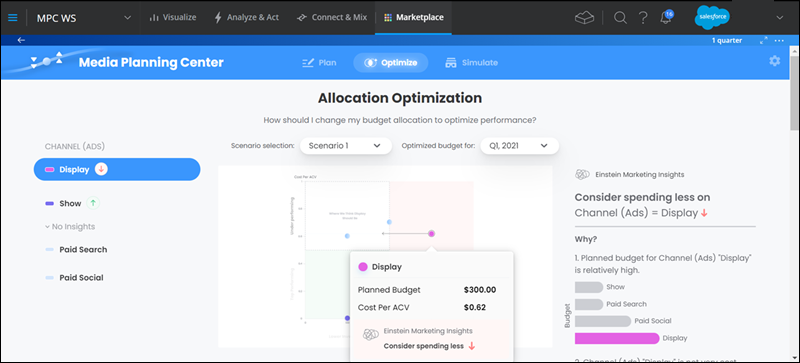
The Optimize section looks at different entities in terms of past performance and
planned budget. It then recommends how you can change your allocated budget to improve
performance. It uses a scatter plot quadrant display, which shows a selected KPI against a certain
dimension associated with the KPI in question.
Required Editions
User Permissions Needed
To run Marketplace apps:
Admins, Power Users, or Viewers
Using EMI Einstein Marketing Insights, you get a further graphical display of the relativity
analysis between the entities in each category. For example, how the selected entity compares to
all other entities in its category in terms of cost-effectiveness and size of the budget.
In Marketing Cloud Intelligence, on the Marketplace tab, select
Apps.
Click Installed Solutions, and then select the Media
Planning Center app.
Select the Optimize tab.
If you define more than one scenario, change the scenario to see the recommendations for
that scenario and year.
On the right-hand side view the recommendations. In this example, it’s recommended you
spend less on Display Ads since your planned budget was relatively high. Display Ads aren’t
cost effective when looking at spend and performance from the last 12 months.
To view a further drill-down, scroll down the page.
You can use these recommendations to reallocate the budget. You can reduce the budget from
an entity that’s budgeted too high and increase it if it’s too low.
Note If you get the error “Single player left in the game” it’s advised that you drill down to
a lower granularity where there’s more than one entity.
Did this article solve your issue?
Let us know so we can improve!
Loading
Salesforce Help | Article
Cookie Consent Manager
Cookie Consent Manager
General Information
Required Cookies
Functional Cookies
Advertising Cookies
General Information
We use three kinds of cookies on our websites: required, functional, and advertising. You can choose whether functional and advertising cookies apply. Click on the different cookie categories to find out more about each category and to change the default settings.
Privacy Statement
Required Cookies
Always Active
Required cookies are necessary for basic website functionality. Some examples include: session cookies needed to transmit the website, authentication cookies, and security cookies.
Functional Cookies
Functional cookies enhance functions, performance, and services on the website. Some examples include: cookies used to analyze site traffic, cookies used for market research, and cookies used to display advertising that is not directed to a particular individual.
Advertising Cookies
Advertising cookies track activity across websites in order to understand a viewer’s interests, and direct them specific marketing. Some examples include: cookies used for remarketing, or interest-based advertising.