Use the Cross-Channel Marketing Insights app to view campaigns across your marketing
channels all in one place. Get customized, data-driven insights. Switch between the different tabs
to explore views and insights of your cross channel marketing data.
Required Editions
User Permissions Needed
To run Marketplace apps:
Admins, Power Users, or Viewers
Note The Cross-Channel Marketing Insights app now supports GA4 and can be selected
alongside UA360 profiles during the installation. In order to pull in GA4 data you must first
uninstall and then reinstall the app. For more information, see Set Up the Cross-Channel Marketing Insights App
.
In Marketing Cloud Intelligence, on the Marketplace tab, select
Apps.
Click Installed Solutions, and then select the
Cross-Channel Marketing Insights app.
To view cross-channel marketing data and get insights, click each tab.
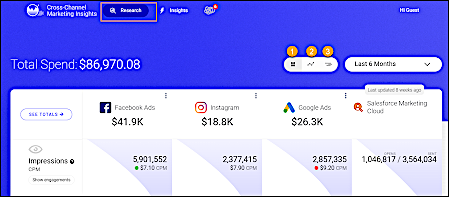
For details on the marketing performance of your connected platforms and to view the most
important metrics, click Research.
To expand your analysis, switch views.
Data View
Compare data metrics for each platform, such as impressions and clicks. Click See
Totals for all platforms by metric within a selected timeframe (1).
Graphic View
Compare platform performance for a selected metric (2).
Glance View
Identify trends by comparing marketing activity to marketing metrics and costs (3).
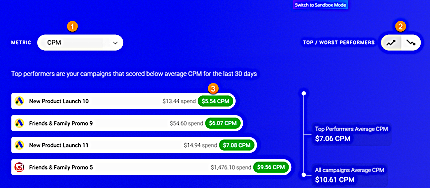
To see top and worst performers based on cost compared to all cross-channel campaigns,
click Insights.
Select a metric (1).
Filter by top performers and worst performers (2).
To view the details of a campaign, click a campaign (3).
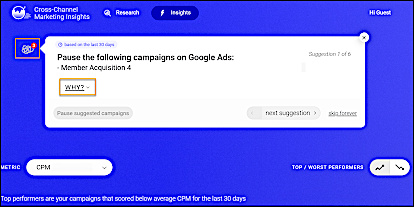
To see EMI insights, click EMI.
EMI suggests
ways to improve your marketing efforts, such as pausing certain campaigns or reallocating
budget to other campaigns. To see more information about an insight, click
Why.
Did this article solve your issue?
Let us know so we can improve!
Loading
Salesforce Help | Article
Cookie Consent Manager
General Information
Required Cookies
Functional Cookies
Advertising Cookies
General Information
We use three kinds of cookies on our websites: required, functional, and advertising. You can choose whether functional and advertising cookies apply. Click on the different cookie categories to find out more about each category and to change the default settings.
Privacy Statement
Required Cookies
Always Active
Required cookies are necessary for basic website functionality. Some examples include: session cookies needed to transmit the website, authentication cookies, and security cookies.
Functional Cookies
Functional cookies enhance functions, performance, and services on the website. Some examples include: cookies used to analyze site traffic, cookies used for market research, and cookies used to display advertising that is not directed to a particular individual.
Advertising Cookies
Advertising cookies track activity across websites in order to understand a viewer’s interests, and direct them specific marketing. Some examples include: cookies used for remarketing, or interest-based advertising.