Download QA templates for testing and validating data sources directly to your
workspace. You can then access the template whenever needed. A new page is created in your
collection for each template you select. You can then go directly to the page and start checking
your data sources.
Required Editions
User Permissions Needed
To run Marketplace apps:
Admin, Power Users, or Viewers
In Marketing Cloud Intelligence, on the Marketplace tab, select
Apps.
Click Installed Solutions, and then select the
Implementation Templates app.
From the Data Provider QA Templates dropdown, select the data source
templates that you want to download to your workspace.
From the QA Validation Templates dropdown, select the validation
templates that you want to download to your workspace.
From the General Templates dropdown, select the templates that you
want to download to your workspace:
Discovery Instructions—Use this template as a checklist when
sitting with a customer during the discovery phase.
Email Optimization—Use this template to check campaign
performance.
MPO—Use this template to check Media Performance Optimization.
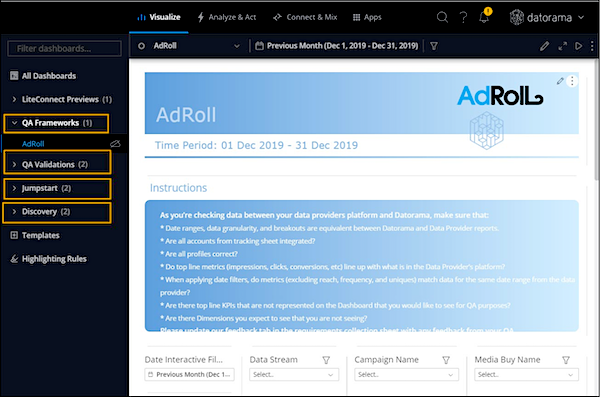
To add the templates to your workspace, click Create. The
Visualize tab opens showing the last created dashboard page displayed
by default. A collection and dashboard page is created for each template that you selected.
QA Frameworks
Contains a dashboard page for each data source that you selected.
QA Validations
Contains a dashboard page for each validation template that you selected.
Jumpstart
If you selected MPO or Email
Optimization, a separate collection is created with a dashboard page for each
template.
Discovery
f you selected Discovery Instructions, two dashboard pages
are created: Discovery Instructions and Rollout
Instructions.
Rollout Instructions
If you selected the Rollout Instructions template, in
addition to the new collection and dashboard page, calculated dimensions are also created.
Review the Rollout Instructions template to see how to use these
calculated dimensions.
Did this article solve your issue?
Let us know so we can improve!
Loading
Salesforce Help | Article
Cookie Consent Manager
Cookie Consent Manager
General Information
Required Cookies
Functional Cookies
Advertising Cookies
General Information
We use three kinds of cookies on our websites: required, functional, and advertising. You can choose whether functional and advertising cookies apply. Click on the different cookie categories to find out more about each category and to change the default settings.
Privacy Statement
Required Cookies
Always Active
Required cookies are necessary for basic website functionality. Some examples include: session cookies needed to transmit the website, authentication cookies, and security cookies.
Functional Cookies
Functional cookies enhance functions, performance, and services on the website. Some examples include: cookies used to analyze site traffic, cookies used for market research, and cookies used to display advertising that is not directed to a particular individual.
Advertising Cookies
Advertising cookies track activity across websites in order to understand a viewer’s interests, and direct them specific marketing. Some examples include: cookies used for remarketing, or interest-based advertising.