
You are here:
Quiet Notifications in MobilePush
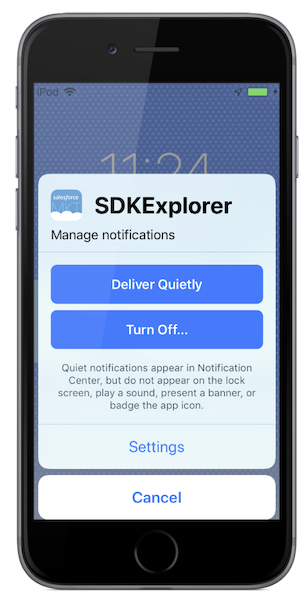
Quiet, also known as provisional, notifications for iOS 12 and later versions are enabled but not shown to the user as an alert. Instead, notifications go to the notification center without an alert, badge, or sound, and the user must swipe to see their notifications for an app. Users do not opt out, but notifications are delivered to the notification center to be viewed later. Users can determine their level of engagement for a specific app.
Key Facts
- App developers enable quiet notifications, and they not enabled in the Marketing Cloud Engagement or the SDK.
- Devices on SDK version 6.2.x or later can track quiet notification status.
- iOS 12 and later versions support quiet notifications.
- Android does not currently support quiet notifications.
- Send Quiet Notifications
When your app developer enables quiet notifications in MobilePush, app users on devices with iOS 12 or later can choose whether their notifications are delivered prominently or quietly. Users can make this selection when they download the app, in the notification center, or in the app settings.
Did this article solve your issue?
Let us know so we can improve!
