
You are here:
Who Receives Your Push Notification
Learn how MobilePush determines which devices to send to.
MobilePush uses a multiple-step process to determine who receives your message. The system sends to all devices for a contact in a filtered list, even if the devices don’t meet the filter criteria. Here is how it works:
- When you create a filtered list, MobilePush looks for and creates a list of the devices that satisfy the filters.
- Before it sends your message, MobilePush looks up the contact associated with each device that satisfied the filters. Each contact can own more than one device.
- MobilePush then sends your message to all the devices owned by each contact, whether or not their other devices satisfy the filters in your filtered list.

Example
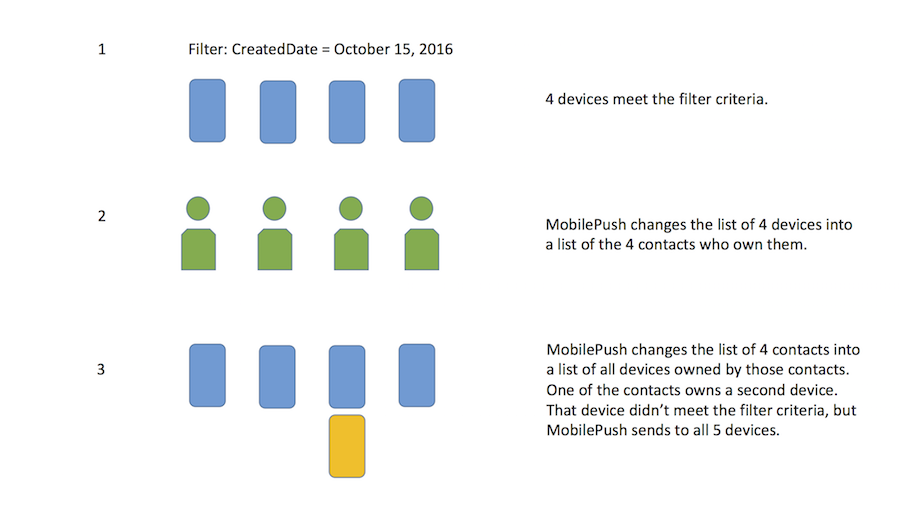
- You create a filtered list of devices that were created in Marketing Cloud Engagement on October 15, 2016. MobilePush finds a list of four devices that were created on October 15.
- You create a message to send to this filtered list. Before sending, MobilePush changes the list of four devices into a list of the contacts who own them. In this example, these devices are owned by four contacts.
- MobilePush changes the list again into all devices owned by the four contacts. If one of the contacts owns a second device, MobilePush sends the message to all five devices owned by the four contacts, even if all the devices were not created on October 15.
Did this article solve your issue?
Let us know so we can improve!
