
You are here:
Results Filter Attribution Statistics
How Personalization calculates attribution statistics can depend on whether individuals are included or excluded from the calculations based on their campaign activity.
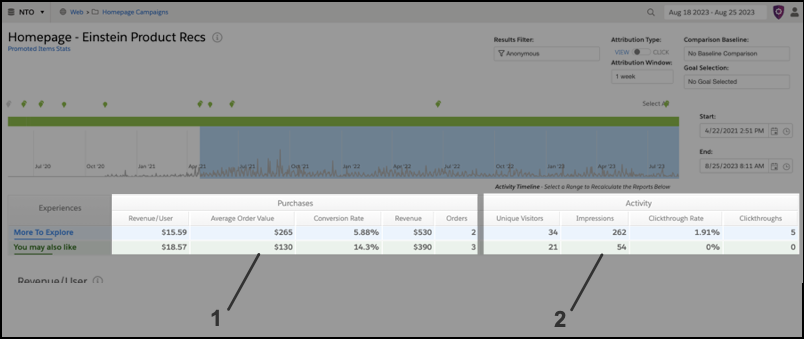
Attribution statistics (1) show values attributed to individuals who have completed the campaign goal, such as a conversion or purchase. Whereas activity statistics (2) include values for all individuals who engaged with the campaign, regardless of whether a conversion or purchase occurred.
When you select a results filter, Personalization applies the filter against campaign events (impressions, views or clicks, and conversions or goals) for the selected start and end dates and time settings. For Personalization to include individuals in attribution statistics, they must match the selected filter for all campaign events within the time range. If they don’t meet this criteria, Personalization excludes the individuals from calculations.
For example, a site visitor impresses anonymously and then logs in to make a purchase, all within the attribution window time frame. The visitor uses both user states (Anonymous and Logged In) and makes a purchase within the attribution window, so Personalization doesn’t include that visitor in attribution calculations when the Results Filter is set to Anonymous. Because individuals aren’t included in the filtered calculation under these conditions, sums of complementary filters, such as Anonymous and Logged In, don’t always match unfiltered totals.
