
You are here:
Ingesting Locale-Specific Product and Catalog Data
You can load localized versions of items into Personalization using several methods. Personalization supports loading localized iterations using the Product Localization ETL Data Feed and Catalog Localization ETL Data Feed. You can also capture the data using the Marketing Cloud Personalization Event API.
When loading the locale information through ETL, including the default locale, use the product locale and catalog object locale ETL.
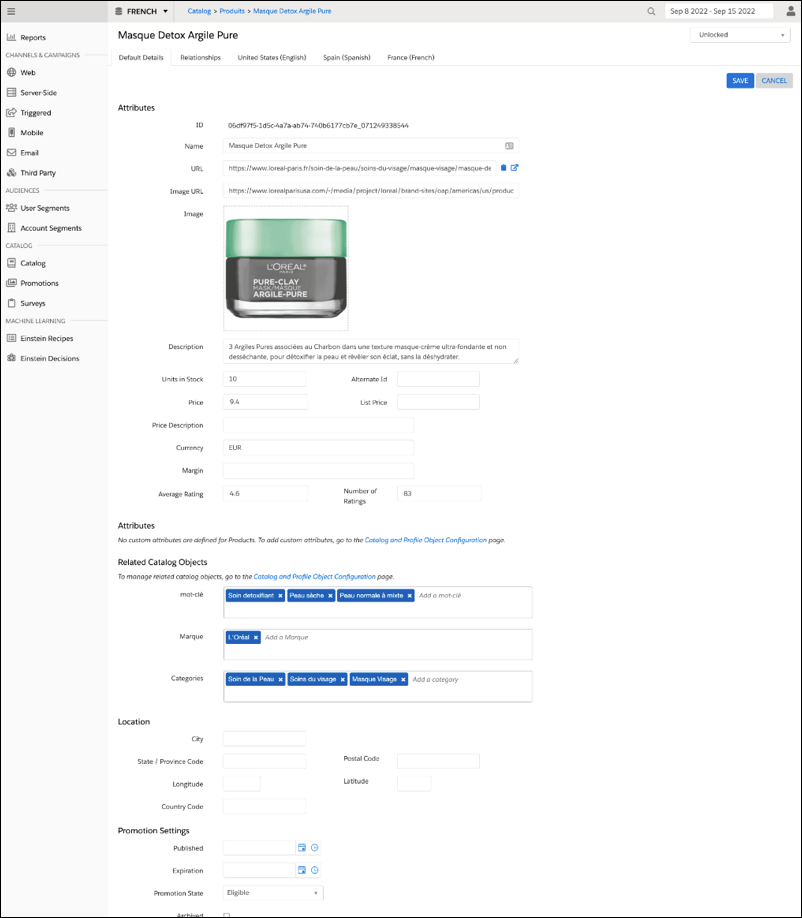
When you view the details for an item in the Catalog list page, you see its default metadata. Each localized version for the item appears as a tab at the top of the page.
| Catalog List Page Information | Localization Effect |
|---|---|
| Item Metadata | If you enable metadata localization but Personalization hasn’t received localized versions of the item from the localization ETL or Event API, the default item metadata appears for events. |
An ETL update for data loaded using the product ETL or catalog object ETL occurs only for default item metadata, not for localized versions. Conversely, an update for data loaded using the product locale ETL and catalog object Locale ETL occurs only for localized item metadata, not the default item metadata. For localized recommendations, use the locale ETLs when updating an item’s localized metadata, including any updates to items matching the dataset default locale. |
|
If you’re using Event API for updates, keep these considerations in mind.
|
|
| Product or Catalog Object Custom Attributes | Custom attributes configured in the catalog object definition don’t support localized iterations. However, these attributes are still returned with localizable attributes in personalized responses to ensure that the data is available for use cases. |
| Localized Item Iterations | When you enable metadata localization and you load localized iterations of an item into a Personalization dataset, the localized versions appear in tabs on the item detail page. Personalization can then return the localized data in personalized experiences that match the user’s locale. For example, a user with a locale of en_US would receive item information in English, whereas a person with a fr_FR locale would receive the item information in French. |
| Default Item Attribute Data | Attribute data in item detail pages appears in the exact format ingested. Personalization doesn’t translate ingested data, except to convert currency based on the selected default dataset currency. |
| Related Catalog Objects | Catalog object relationships in item detail pages appear with the exact values specified for the labels. Personalization doesn’t translate ingested data. The related catalog objects appear in the exact format ingested. |
