
You are here:
Build Category Hierarchy Using the Sitemap/Event API
Using the Sitemap/Event API to build category hierarchy with a many-per-item category cardinality results in a pipe-delimited category structure that is separate from the idPath framework used by the category ETL.
Using this approach, the ID path attribute doesn’t appear below the ID attribute on an item detail page. Instead, a path view appears below the name of the item at the top of the page.
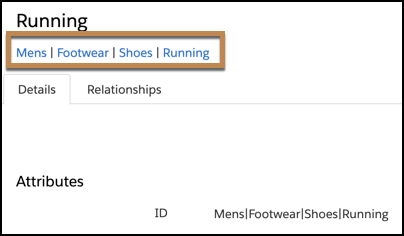
Another benefit of using the Sitemap/Event API is that it creates a faceted tree view in the UI that is easy to understand.
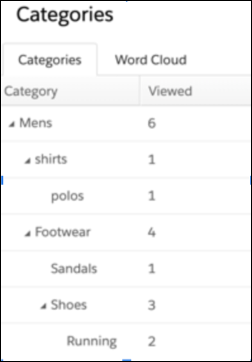
A pipe-delimited category tag is treated as a single category tag for an item. However, the categories appear separately in the faceted tree view. For example, a category of is a single category tag on an item, but it displays in the category UI tree as four levels.
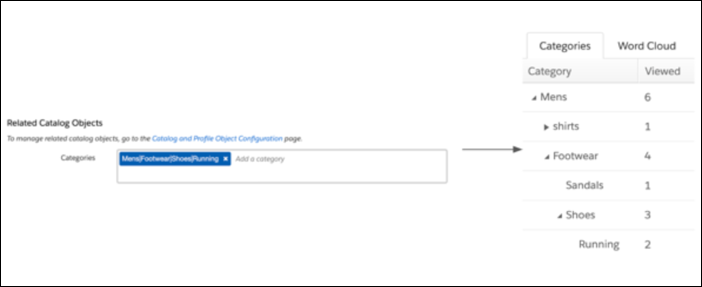
Applying Categories to Products, Blogs, or Articles Using the Sitemap/Event API
When using the Sitemap/Event API to apply categories to a product, blog, or article, keep these considerations in mind.
- The Sitemap/Event API leverages user events for category creation and hierarchy construction. For this reason, you can’t bulk load your category hierarchy structure. If you want to bulk load categories, use the category ETL approach instead.
- To enable the sitemap to set category values on an item, disable strict catalog security. When strict security is enabled, categories populate on the category page but aren’t applied to items. For more information, see Strict Catalog Security.
- A pipe-delimited category tag in an event, from either the sitemap or API, is treated and stored as a single tag for the item. For example, a view against an item that has the category Mens|Footwear|Shoes|Running tracks a view against each tier of the tree in the UI.
- Sending a hierarchy in an event where the order of the category item doesn’t match
what’s stored results in a new tag being added to the item. The event also tracks
statistics against each tier of the new tag. For example, a view event occurs on an
item with Mens|Footwear|Shoes|Running as a tag. However, the item includes categories
for only Mens|Footwear|Shoes, but not Running. Because the categories don’t match,
the event creates a tag on the item and then tracks a view against the Mens,
Footwear, and Shoe categories.

- The product ETL can’t append a pipe-delimited hierarchical category to an item. For this reason, we recommend not updating categories using the product ETL when relying on the pipe-delimited structure that’s set using the Sitemap/Event API. The ETL replaces what is on the item with what is provided in the ETL. For example, Mens|Footwear|Shoes|Running replaces a hierarchical tag with four individual category tags.
- When using the Sitemap/Event API approach, ensure that all events sent for an item include the full pipe-delimited structure and that category capitalization is consistent.
Using Sitemap/Event API Categories in Segments and Machine Learning
When using categories in segments and in Einstein recipes, keep these considerations in mind.
- If all sent events contain the full pipe-delimited hierarchy for an item, we
recommend creating a segment for the top-level category (for example, Men’s). This
segment would include anyone who viewed an item in the top category or lower.
When using the Sitemap/Event API approach, an event can occur only against the top-level category for that category to be a standalone, selectable option.
- By default, when using categories in Einstein recipe exclusions or inclusions, selecting a higher-level category doesn’t affect items containing lower-level categories. For example, excluding a higher-level category doesn’t automatically exclude items that contain lower-level categories. To either exclude or include lower-level categories, check the Also exclude child categories or Also include child categories option for the category you’re configuring.
