
You are here:
Referring Sources Report
Personalization starts the moment a visitor arrives on your site, so you want to know how they got there. Use the Referring Sources report to view how people arrived on your site so that you can customize your messaging for each visitor.
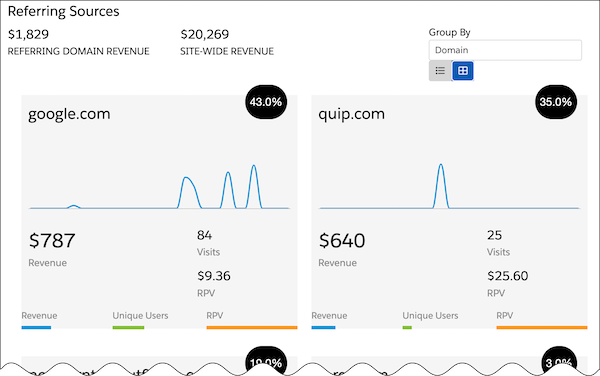
To attract visitors, you can use the information in the Referring Sources Report. Say for example your highest referring source is Facebook, but it has the highest bounce rate, and visitors referred by Facebook spend the least amount of time on your site. You can design a campaign to provide a second-chance message with a special call to action for those visitors.
The Referring Sources report supports two views.
| Option | Description |
|---|---|
| Summary view | See key statistics on visitors referred by top sources. To see date, time, and revenue details, hover over the graph. |
| List view | Group data by referring sources such as domain or search term, UTM code, or location. You see information such as bounce rate, average visit duration, number of pages viewed, and average and total revenue. To export the data to a CSV file, click Export. |
To see the Group By and Summary View, enable Catalog Settings > Revenue Tracking. Otherwise, only the List view is visible.
The Referring Sources report includes this information.
| Value | Description |
|---|---|
| Name | Where visitors originated |
| Revenue | Revenue attributed to visitors from the source |
| Visits | Number of visits from the source |
| RPV | Revenue per visit |
| Percentage of total revenue | Percentage of total revenue attributed to visitors from the source |
| Bounces | Visits with a single page view |
| Bounce rate | Bounces divided by total visits |
| Average visit duration | Average length of time a visitor spends on the site |
| Average pages | Average number of pages viewed by visitors to the site |
