
You are here:
Mapping Values From Sales and Service Cloud to Personalization
Using the Personalization action element, you select a dataset to send Sales and Service Cloud data to. You can then map data from Sales and Service Cloud to identities, user attributes, and profiles to attributes or profile object types in the Personalization dataset.
Defining a Named Individual Profile
Information mapped from Sales or Service Cloud is used to build Named Individual Profiles for users. When mapping identities, user attributes, or profile objects, keep the following in mind:
- Identities are values that uniquely identify users, like individual IDs, phone numbers, or email addresses.
- User Attributes are values that identify users, like names, birth dates, or addresses, but they’re not necessarily unique.
- Profile Objects contain related information about individual users. These objects can be things like service cases, opportunities, event attendance, and so on. Unlike User Attributes, users can have multiple profile object records. For example, a user can have several service cases, multiple opportunities at various stages, and attend various events. You can also associate up to 10 attributes with each profile object to provide more detail about them. For example, you can add a Status attribute to enhance information about a Service Case profile object. To learn more, see User Profile Objects.
Mapping Values and Attributes
Each mapping that you create in the Personalization action element for Identities, User Attributes, and Profile Objects requires both a Value and an Attribute.
- Value—Data sourced from Sales or Service Cloud and sent to
Personalization when the flow is triggered. You can use several methods to define values:
Method Source Example Record Records can come from several different sources, like Get Record elements, actions outputs, variables, and so on. 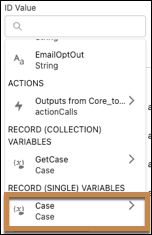
Variable You can define variables in Assignment elements within the Flow. 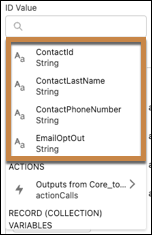
API name You can manually enter API names. Typing {!$Record.Id} resolves to the global record Contact ID variable. Literal value Literal values are constants that you manually enter. Some examples include:
- Zip codes
- Addresses
- Names
- Dates
- Attribute—The Marketing Cloud Personalization target that you want to send Value data. In other words, you send Value data from the Sales or Service Cloud you select to a Personalization Attribute that you specify. You can view any attribute sources or definitions for Identities, User Attributes, and Profile Objects in the Marketing Cloud Personalization Application.
Did this article solve your issue?
Let us know so we can improve!
