
You are here:
People Records in Marketing Cloud Next
Marketing Cloud Next includes records that can store data about people who interact with your business at different stages of your marketing, sales, or service lifecycles.
Required Editions
| Available in: Salesforce Enterprise and Unlimited Editions with Marketing Cloud Next Growth or Advanced Edition |
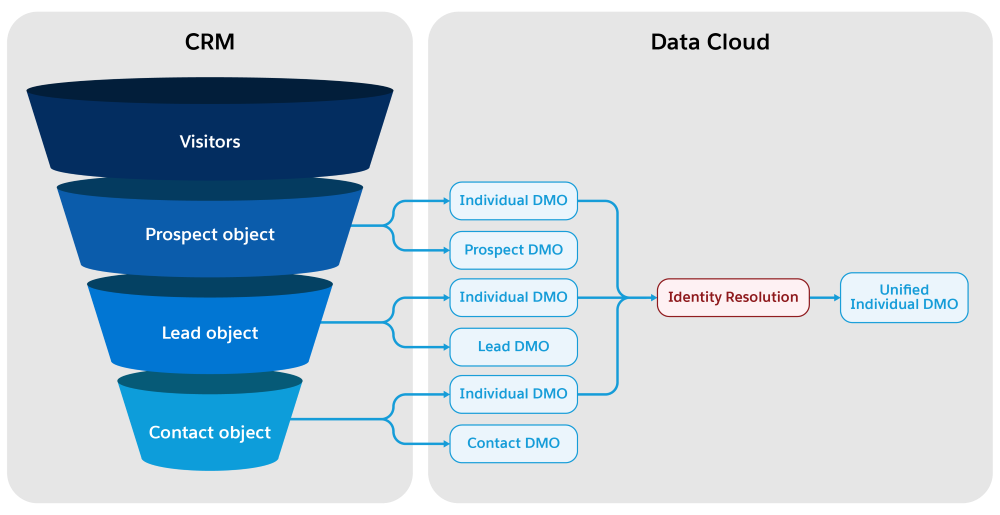
This diagram shows how each stage of the customer journey is mapped to Data Model Objects (DMOs) in Data 360. Identity Resolution consolidates records from multiple sources into a unified customer profile.
Some supported actions are common among the Salesforce objects that store people data. Here’s a sample list of these common tasks.
- Create, edit, share, and delete a record
- Import records in bulk with a CSV file
- Automate record creation in a marketing flow using the Create Records element
- Customize page layouts with related lists, buttons, and other Lightning components
Differences Between Prospect and Lead
Understand the key distinctions between prospects and leads to organize and prioritize your potential customers more effectively.
When you use Sales Cloud or Service Cloud together with Marketing Cloud Next, you can also log sales activity or add a lead to a case.
Contacts
A contact represents someone who has a business connection with you as part of an open deal, an ongoing relationship, or a closed work effort.Contacts can be imported in bulk, created individually, or created by converting a qualified lead.
Example Contact Actions
- Add or automate consent status for a contact
- Score and grade contacts on engagement activity
- Convert a lead to a contact
When you use Sales Cloud or Service Cloud together with Marketing Cloud Next, you can also log sales activity or add a contact to an opportunity using Opportunity Contact Roles.

In addition to selling directly to consumers, Ursa Major Solar fills wholesale orders for panel installation and replacement parts.
When sales rep Lance Park picks up a retail lead from Coastal Improvements, he can get an idea of the lead’s interests by checking the campaigns they engaged with. Things go well, and when he closes the deal, he converts the lead record into a contact record.
The relationships among these records provide a fuller picture of someone’s experience with your brand.
Individuals and Unified Individuals
Each time you import or create a new prospect, lead or contact, an individual record is created in Data 360 during the next sync. When your identity resolution rulesets run, any individuals with matching information are consolidated into a unified individual record.
A unified individual record isn’t a static "golden record" but a collection of specialized IDs that relate to relevant pieces of data from various source records. Those pieces of data are then flagged as contact points, such as a phone number or email address, and used when you create a segment for a marketing campaign.
Prospects are treated as unified individuals, so you can create a unified individual segment, define rules for your prospects, and add them to campaigns.
You can’t create individual or unified individual records manually—they’re created only by syncing and harmonization processes.
Related Records
Other record types, such as account and campaign member, contain adjacent data to clarify relationships or support specific use cases and actions.
The account object represents someone’s business and is required for creating a contact. You can track account details, such as company size, industry, and ID fields, for various regulatory bodies and associations.
A marketer can also create campaign member records, which relate a person to a marketing campaign for reporting and segmentation purposes. Use the campaign member status field to track their engagement with you, such as Responded or Attended.
- Considerations for Prospects
When working with prospects in Marketing Cloud Next, keep these considerations in mind. - Working with Prospects
Focus on high-value prospects, while unqualified ones remain hidden until they reach the required engagement score. You can add prospects to Marketing Cloud Next manually or import them in bulk. - Convert Prospects in Marketing Cloud Next
After a prospect meets the required engagement score, convert them to leads or contacts manually or set up an automated flow to convert them. - Prospect Field Conversion Mapping
To ensure accurate data transfer, see how the prospect’s fields map to the fields in the Lead, Contact, or Account on conversion. - Set Up Lead Assignment Rules
After a prospect is converted to a lead, lead assignment rules determine how the record owner is assigned. To assign a different record owner for leads, you can create a new rule.
