
Managing Your Business Unit
You can edit your business unit settings in different places in Account Engagement, based on whether you use Lightning Experience or the standalone app.
Required Editions
| Available in: All Account Engagement Editions |
In the standalone app, click the cog icon on any page to access Settings.

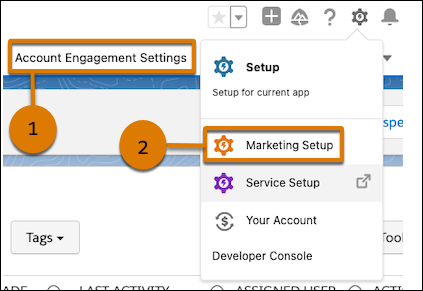
In the Account Engagement Lightning App, most settings are available on the Account Engagement Settings tab (1). Others, such as the setup tasks for B2B Marketing Analytics and Marketing App Extensions, appear in the Marketing Setup app. Access Marketing Setup by clicking the cog icon on any page in the app (2).
- Feature Availability by Account Engagement Edition
Marketing Cloud Account Engagement is sold in four editions: Growth, Plus, Advanced, and Premium. All editions require Salesforce Enterprise or Unlimited Edition. Certain features require extra SKUs, licenses, or add-ons. - Browser Support for Account Engagement
You can use the standalone Account Engagement app in the most popular browsers. - Business Unit Settings for Account Engagement
Admins can control settings for the entire business unit. Depending on your edition or app, some feature-level settings also appear on the Account Engagement Settings page. Review feature-specific help for information about those settings. - Managing Users and Preferences
Admins can create and manage users, who can manage some of their own settings and preferences. Logging into Account Engagement requires Salesforce single sign-on (SSO). To simplify user management and transfer it to Salesforce, we recommend setting up Salesforce User Sync. - Copy Marketing Assets Between Account Engagement Business Units
Share marketing assets, such as email templates, files, custom fields, and custom redirects, across business units without manually recreating them. - Monitor Business Unit Health with Account Engagement Optimizer
Use Optimizer to help you diagnose and correct critical configuration issues and review recommendations to improve processing efficiency in your business unit. You can also pause and resume actions that are currently processing and see which features are causing the most changes to prospect records. - Visitor Tracking for Account Engagement
To collect activity data and give visitors a seamless experience, set up tracker domains and add Account Engagement tracking code to your web pages. When you create marketing assets, you can choose which tracker domain you want to use for vanity URLs and link rewriting. - Prospect Security and Privacy
Account Engagement offers tools to help you protect the privacy of your prospects and the security of their data. Many of these tools are enabled by default when you create your business unit. - Manage Encryption Keys with Bring Your Own Encryption Key (BYOK)
Organizations find BYOK useful for key lifecycle management and control, data protection and security, regulatory compliance, data portability, and more. With BYOK, you can secure your marketing database with an encryption key that you manage and then, in an emergency, revoke access to your Account Engagement data. No one has access to this key–not even Salesforce–so after access is removed, the data becomes unreadable. - Manage Marketing Needs
Account Engagement admins have access to tools that can help your marketing team get the most out of their efforts. - Data Usage and Limits
There are limits on objects in Account Engagement, such as mailable prospects, email templates, and landing pages. The limits for each object depend on your edition of Account Engagement. You can view your current usage and move objects to the recycle bin as needed. - Product and Service Notifications
Account Engagement sends different types of product and service notifications. You can designate a different point of contact for each notification in the Product and Service Notifications table in your business unit settings. - Use Marketing Cloud Account Engagement APIs
Use the Account Engagement APIs to create integrations that meet your business needs. Access prospect and visitor data in a third-party system, automate processes, and more. - System Emails
Admins can see a log of all system email notifications for the past 14 days. - Role-Based Email Addresses
Because role-based email addresses often represent multiple recipients, they’re more likely to generate spam complaints. To help protect your sending reputation, Account Engagement restricts importing and sending to these email addresses by default. If you have a legitimate business reason to import role-based email addresses, contact Salesforce Customer Support. - Grant Salesforce Customer Support Access to Account Engagement
Grant users Salesforce Customer Support access to Account Engagement so that they can view and edit records and users in your business unit. Access is timestamped.
Did this article solve your issue?
Let us know so we can improve!
