Filter Prospects with Conditional Completion Actions
For more control over which prospects you take action on, add conditional completion
actions to your marketing assets. While standard actions execute on all prospects who interact
with an asset, conditional actions execute only on prospects who also meet criteria that you
define. You can combine both types of actions on one asset to target your prospects more
effectively.
Required Editions
Available in: All Account
Engagement Editions
How Conditional Actions Work
Conditional actions offer an added layer of control by letting you choose prospect criteria as
a condition for the action. Filter based on system data such as email opens or prospect fields
such as City or Territory. Conditional actions execute on prospects who meet the trigger
criteria and also meet the prospect criteria you define.
To add conditional actions, you first add a conditional group. For each conditional group, you
define prospect criteria and add conditional actions. Conditional actions only execute if
prospects meet the trigger criteria and the prospect criteria for that group. You can have up to
six conditional groups per asset trigger.
Use Cases
Use a single conditional action to target specific prospects, or combine multiple standard and
conditional actions for more robust targeting.
Example You have a signup form for a new industry conference you’re hosting. You want to set the
lead source for new prospects who sign up without changing the lead source for existing
prospects.
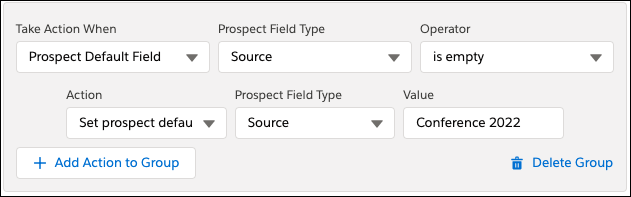
Add a conditional group and specify criteria to limit actions in that group to
prospects with an empty source field. Then, use the Change prospect default field
value action to update the source field to the value you want, such as Conference
2022.
Example When prospects submit your signup form, you want to send a welcome email. But, you also
want to add prospects to the appropriate sales queue and email list based on whether they live
in California or Washington.
To send your welcome email to anyone who completes the form, add a standard
Send autoresponder email completion action.
Add a conditional group and specify criteria for prospects who live in California. Use
the Assign to queue action to add them to the California sales
queue. In the same group, use the Add to list action to add them to
your California leads mailing list.
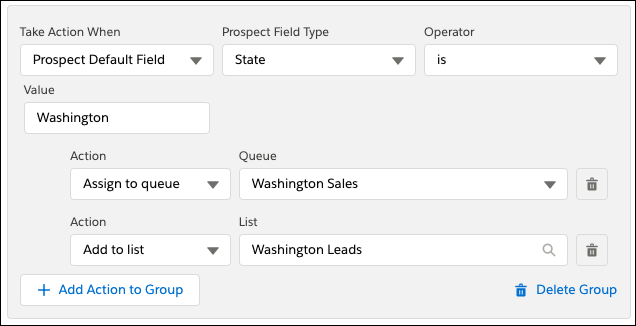
Add another conditional group and specify criteria for prospects who live in Washington.
Use the Assign to queue action to add them to the Washington sales
queue. In the same group, use the Add to list action to add them to
your Washington leads mailing list.
Conditional Group Prospect Criteria To add conditional completion actions to assets, create a conditional group based on prospect criteria. The criteria are available in the first dropdown when you add a conditional group.
Did this article solve your issue?
Let us know so we can improve!

Loading
Salesforce Help | Article
Cookie Consent Manager
General Information
Required Cookies
Functional Cookies
Advertising Cookies
General Information
We use three kinds of cookies on our websites: required, functional, and advertising. You can choose whether functional and advertising cookies apply. Click on the different cookie categories to find out more about each category and to change the default settings.
Privacy Statement
Required Cookies
Always Active
Required cookies are necessary for basic website functionality. Some examples include: session cookies needed to transmit the website, authentication cookies, and security cookies.
Functional Cookies
Functional cookies enhance functions, performance, and services on the website. Some examples include: cookies used to analyze site traffic, cookies used for market research, and cookies used to display advertising that is not directed to a particular individual.
Advertising Cookies
Advertising cookies track activity across websites in order to understand a viewer’s interests, and direct them specific marketing. Some examples include: cookies used for remarketing, or interest-based advertising.