
How It Works
Einstein Key Accounts Identification handles the selection phase of your account-based marketing efforts by offering two values: a tier ranking and key factors.
Required Editions
| Available in: Account Engagement Advanced and Premium Editions with Salesforce Enterprise, Performance, or Unlimited Edition |
Building Your Model
To build your model, we start with historical data about your accounts and when an associated opportunity was created. Einstein looks for patterns among your accounts’ engagement data and related objects to identify attributes, or key factors that are most impactful on a successful outcome.
We also use data from our company enrichment repository to fill in gaps where your account records are missing information, such as company size or industry. The repository is populated with publicly available information from websites, including company sites. We combine this data with yours to optimize the types of relationships the model can identify.
Displaying Results
The Einstein Key Accounts card appears on an account record and contains a few important pieces of information. When the model identifies correlations among your accounts and their predicted outcomes, the card is updated.
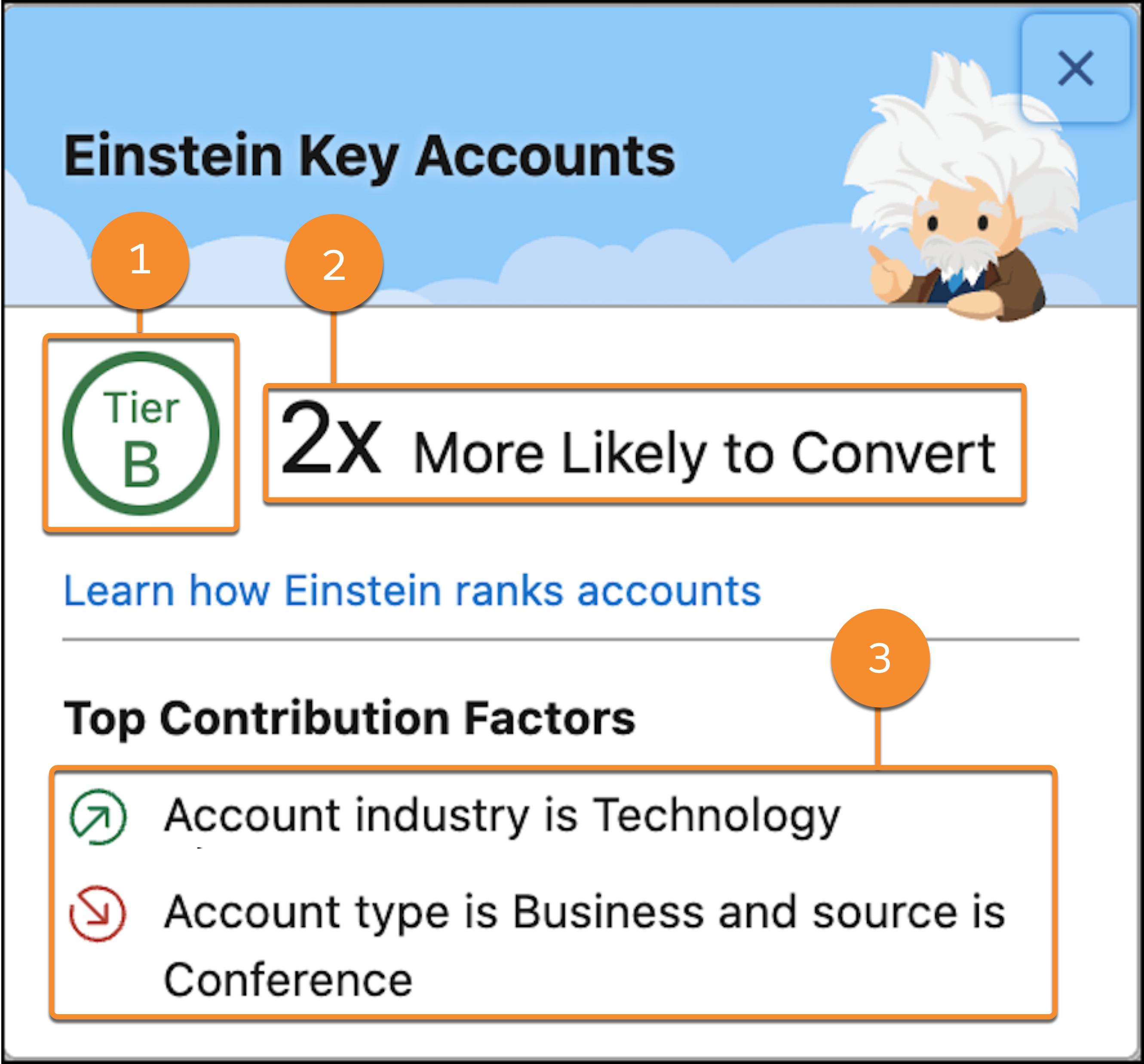
- Account Tier
- An account’s tier ranking (1) is based on the uplift value determined by your data and custom model only. That is, tier sizes and criteria aren’t standard, and vary from org to org. In addition, the model continues to learn from new data, so tier ranking and uplift value can change over time.
- A tier can be A, B, C, or D, where A indicates the highest likelihood of success.
- To use the account tier field as a filter in your automation rules, dynamic lists, and engagement programs, an admin must first configure it as a custom field in Account Engagement.
- Uplift Value
- The number value (2) is called an uplift value. This value is assigned per tier and suggests the account’s likelihood of conversion. In Einstein Key Accounts Identification, conversion is based on whether an opportunity is created on an account within the next 6 months.
- The uplift value compares the chances of conversion between an account in the given tier versus a randomly selected one. An uplift value that’s greater than 1 tells you that it’s more likely to convert an account in the given tier than a random account. A value of less than 1 indicates that the accounts in the tier are less likely to convert compared to others.
- Contribution Factors
- A robust model can provide up to four contribution factors (3). In most cases, at least one contribution factor appears on the card. When the area is blank, the model hasn’t yet identified a key factor that influences conversion more significantly than any others.
- Data Requirements and Usage
- Einstein Key Accounts Identification requires positive and negative account data. For best results, we recommend that you have at least 200 accounts with won opportunities and 200 accounts with lost opportunities from the last 2 years.
- The Einstein Key Accounts Identification model scans for signals on fields from objects such as the ones listed here.
-
- Account
- Contact
- Currency Type
- Event
- Lead
- Opportunity
- Opportunity Contact Role
- Opportunity Line Item
- Prospects
- Visitor Activities
- Pricebook Entry
- Task
