Remind prospects of recurring events, renewals, and other activities with repeating
engagement programs. Allowing prospects to enter a program more than one time simplifies your
workflow and saves you the time of rebuilding duplicate programs.
Required Editions
Available in: All Account
Engagement Editions
All the standard considerations for using engagement programs apply to programs that are
repeatable. Here are a few additional considerations for working with repeating programs:
You can have up to 10 scheduled and active repeating programs at a time.
After you start a repeatable program, you can’t change it back to a one-time program.
However, you can edit the re-entry settings.
Prospects repeating a program an excessive number of times can cause performance issues.
To help avoid excessive repeats, you can limit how many times a prospect is eligible to
enter a program.
For programs with limited entries, the start and end steps show you how many prospects
completed the program and are eligible to reenter.
The tooltips show the total number of prospects who completed steps and doesn’t account
for repeat prospects. For example, if 5 prospects enter a program twice, the number would
be 10.
When you edit re-entry settings for an active program, the new settings apply to
prospects currently in the program. For example, if you decrease the max entry limit,
prospects on the end step who meet the new limit aren’t eligible to reenter.
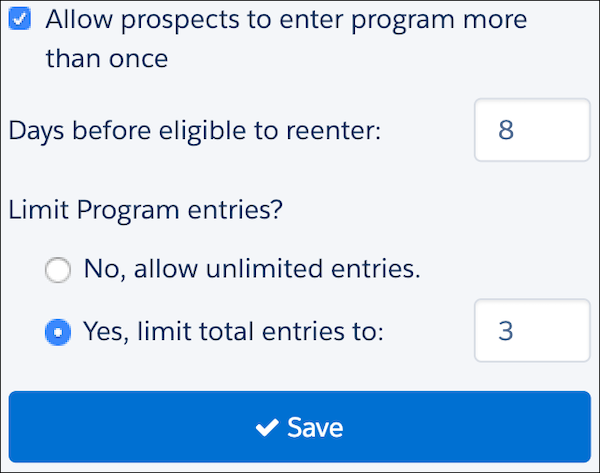
To make a program repeatable, select Allow prospects to enter a program
more than once when you create or edit a program. Use only whole numbers for the
days before eligible to reenter setting, and if you limit total program entries.
Did this article solve your issue?
Let us know so we can improve!
Loading
Salesforce Help | Article
Cookie Consent Manager
Cookie Consent Manager
General Information
Required Cookies
Functional Cookies
Advertising Cookies
General Information
We use three kinds of cookies on our websites: required, functional, and advertising. You can choose whether functional and advertising cookies apply. Click on the different cookie categories to find out more about each category and to change the default settings.
Privacy Statement
Required Cookies
Always Active
Required cookies are necessary for basic website functionality. Some examples include: session cookies needed to transmit the website, authentication cookies, and security cookies.
Functional Cookies
Functional cookies enhance functions, performance, and services on the website. Some examples include: cookies used to analyze site traffic, cookies used for market research, and cookies used to display advertising that is not directed to a particular individual.
Advertising Cookies
Advertising cookies track activity across websites in order to understand a viewer’s interests, and direct them specific marketing. Some examples include: cookies used for remarketing, or interest-based advertising.