
External Actions: Next Steps
After you have a marketing app extension, a business unit assignment, and an action type, work with a developer to customize the action for Engagement Studio. Control which inputs are required when the action is added as a step in an Engagement Studio program. You can also use HML merge fields to automatically populate certain fields when the action executes.
Required Editions
| Available in: Account Engagement Plus, Advanced, and Premium Editions |
Design an Action to Fit Your Needs
Before you contact your developer to customize your action, decide how you want it to function. Here are some questions to ask yourself.
- Which external action do I want to my team to have access to in an Engagement Studio program?
- What information do I want my marketing team to provide when they add the action in Engagement Studio? For example, do you want them to supply a campaign ID in each place that the action is used?
- What information does my team or third-party app need when this action executes? For example, if your action creates a lead in Salesforce, do you want the name of the campaign to automatically populate?
You can configure an external action to be as specific or as general as you need. Specifying default information to automatically populate can save you time. However, if reuse is important to you, keeping actions more general and requiring more inputs lets you use the action more broadly across different Engagement Studio programs.
Work with Your Developer
When you know how you want to customize your action, contact your developer. Be as specific as you can about how you want your action to work and what you’ve done so far. If possible, give the developer access to Marketing Setup to edit the action schema field directly. If you prefer not to provide access to Marketing Setup, the developer can update the action using Tooling API.
Using External Actions
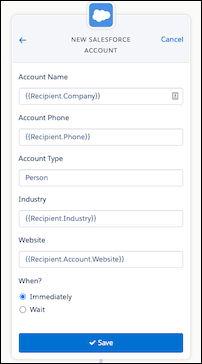
After the action schema is configured and the action type is active for automations, you can use the action in Engagement Studio. Fields included in the View section of the action schema appear when you add the action to an Engagement Studio program, along with default values specified in the schema. You can edit the fields and use HML merge fields to automatically populate Account Engagement data when the action executes.
Editing an active action type can impact Engagement Studio programs the action is used in. If you add default values for fields that are editable in Engagement Studio, it doesn’t update existing steps where the action is used. The new defaults display only on steps that you add after updating the values in the schema.
There are four scenarios where prospects skip an action step in Engagement Studio, but it still appears when you edit the program.
- When you deactivate an external action in Marketing Setup. The action is labeled as inactive in Engagement Studio.
- When you remove the business unit assignment from the related marketing app extension in Marketing Setup, the action is labeled as deleted in Engagement Studio.
- When you’ve exceeded the daily limit of 100,000 external actions. After the limit is reached, prospects skip steps for external actions for the remainder of the day. Actions can be triggered again after the clock resets at midnight based on the default time zone for your business unit.
- When an action takes too long to execute in the third-party system. If an action doesn’t execute within 5 seconds or less.
