
Managing Multiple Business Units
Whether your enterprise has marketing goals based on geography or product lines, help each division focus on their own unique marketing objectives using multiple Account Engagement business units. Prospects and marketing assets are partitioned by business unit, so your divisions can market independently and still get a global view with B2B Marketing Analytics.
Required Editions
| Available in: Account Engagement Advanced and Premium Editions |

Business unit features organize and report on the effectiveness of your marketing.
- Control what records sync with Marketing Data Sharing.
- Provision new business units from Salesforce using the Marketing Setup assistant.
- Get a unified view of your business units with B2B Marketing Analytics.
General
- The ability to manage multiple business units is available only to customers who purchased or upgraded to Advanced Edition on or after February 11, 2019.
- Business unit features are available only in Account Engagement Lightning App.
- When you provision a business unit, the Salesforce connector is automatically created in
a paused state. The connector user has View All Data and Modify All Data permissions for
Salesforce objects that sync between systems. To prevent duplicate records and skewed
reporting, limit what syncs to each business unit before you unpause the connector for the
first time.
To Control Use Lead, contact, opportunity, and custom object syncing Marketing Data Sharing (recommended), or organization-wide defaults and sharing rules Which users belong to a business unit Salesforce User Sync and assign users to business units by public group membership, by role, or individually Which connected campaigns sync to a business unit Campaign record types when configuring Connected Campaigns - A lead or contact record can sync with a prospect in one business unit. Giving multiple business units access to a lead or contact causes data conflicts and can affect sync speeds. To have a prospect in multiple business units, create duplicate records that represent the same individual and sync each record with a separate lead or contact.
- A connected campaign can sync with only one business unit.
-
The Salesforce data that’s available to Account Engagement users is determined by their Salesforce permissions. The Account Engagement data that users see in Salesforce is determined by their business unit.
- You can edit the business unit name in Marketing Setup.

Switching Between Business Units
Some users, such as admins and marketing managers, can switch between business units to manage assets, records, and settings..
Using the Business Unit Switcher
The current business unit name is displayed on the Account Engagement Dashboard tab. When the user logs in to Salesforce, they’re logged in to the last business unit they worked in.
To switch between business units, navigate to the Account Engagement Settings tab in Account Engagement Lightning App, and then select a business unit from the dropdown.
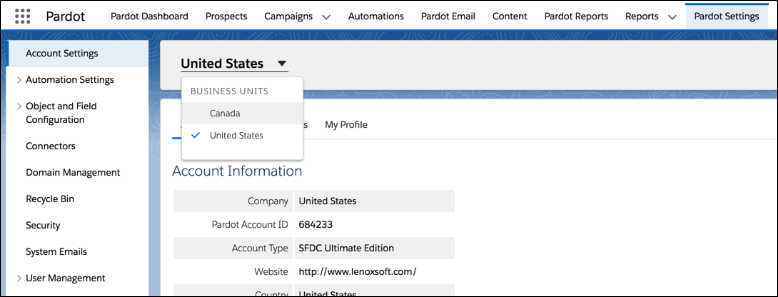
- User Sync enabled and a verified v2 Salesforce connector.
- Access to Account Engagement Lightning App.
- A user record in each business unit, all connected to the same Salesforce org. Each user record must be connected to the same Salesforce user.
What’s Affected By the Business Unit Switcher
When you switch between business units, Account Engagement components show the data and assets from only your current business unit. Pages without these components, such as a campaign list view, aren’t affected when you switch business units.
Account Engagement Lightning App pages show only the records and assets from only the current business unit. For example, the Prospects page shows only the prospect records associated with the current business unit. On Leads, Contacts, Campaigns, and Reports pages, switching business units affects only the Account Engagement Visualforce pages and Lightning Actions and components on those pages.
If your page layouts include Visualforce pages or Lightning Actions from the Account Engagement managed package, pages show and interact with data from only the current business unit.
- The following lead and contact Visualforce pages show only the activities and lists
related to the current business unit.
- AddToPardotList
- EngageCampaignsContactRecord
- EngageCampaignsLeadRecord
- Marketing Action Summary Contact
- Marketing Action Summary Lead
- Pardot Activities
- Pardot List Membership
- Pardot Social Data
- SendPardotEmailContact
- SendPardotEmailLead
- The following Lightning Actions and components show and interact with only the data
related to the current business unit.
- Send Engage Email (shows related templates)
- Add to Nurture Lightning (shows related lists)
- Send to Pardot (sends related leads and contacts)
- Send Pardot Email (shows related templates)
- Engagement History related lists and Lightning component (shows related activities)

