You are here:
User Sync Basics
User Sync moves Account Engagement user access settings to Marketing Setup in Salesforce. Synced user records in Account Engagement are read-only and inherit information from Salesforce.

Process Overview
If you use the legacy version of User Sync, make sure you also review Considerations for Moving to the Latest Version of User Sync. If you're not sure what your User Sync status is, see Find the Right User Sync Documentation.
To take advantage of Salesforce User Sync, first assign Salesforce users to Account Engagement and then transfer user management to Salesforce. This process requires a Salesforce admin and an Account Engagement admin. Depending on the structure of your business, it’s possible you need more than one person to complete all the tasks.
This video walks through User Sync setup:  Manage
Engagement Users with Salesforce User Sync (English Only).
Manage
Engagement Users with Salesforce User Sync (English Only).
User Management
Here’s how user management works after user management is transferred to Salesforce.
- An Account Engagement user record is created for any user assigned to Account Engagement in Salesforce. You can assign users individually, or based on public group, role, or role and subordinates.
- The Salesforce user record is the source of truth. All Account Engagement user fields update to match the Salesforce record.
- When a user sends an email in Account Engagement, the email is sent from the email address on their Salesforce user record.
- Account Engagement user alerts and notifications are sent to their Salesforce email.
- If an assigned user is in the recycle bin in Engagement, the user record is restored.
- To delete an Account Engagement user, unassign them in Salesforce. Unassigning a user sends their record to the recycle bin in Engagement.
- If there’s an Account Engagement user with the same email address as a Salesforce user but they’re not mapped, User Sync skips them. A new Account Engagement user record isn’t created and the existing user profile isn’t synced.
- Changes to user records in Salesforce typically sync within 10 minutes. If you have tens of thousands of users, the sync can take up to an hour.
Salesforce Profiles and Account Engagement Roles
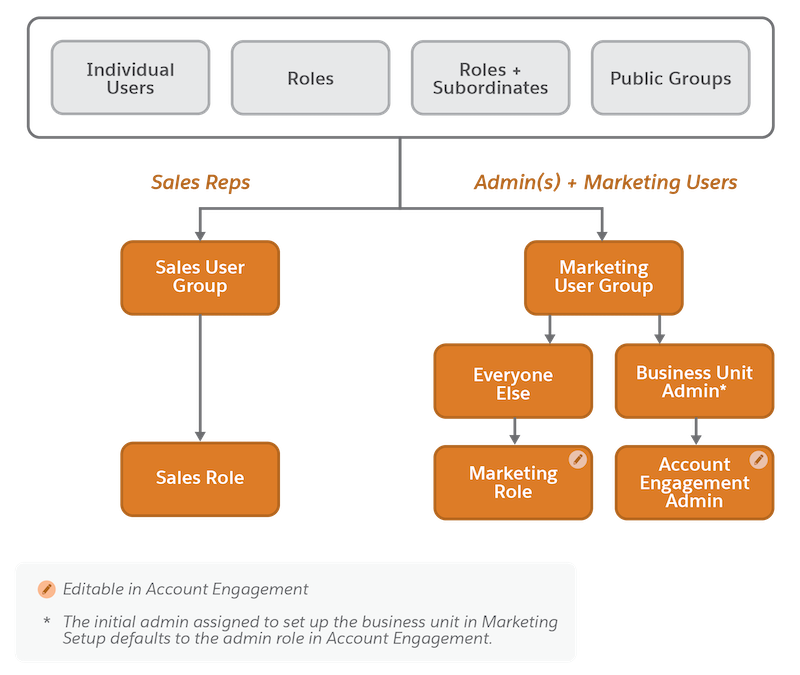
When you assign users to Account Engagement, you add them to the Marketing Users group or the Sales Users group. User group assignments can be used for sharing rules, and they correspond to default Account Engagement role assignments.
Salesforce profiles are mapped one-to-one to Account Engagement user roles, but some scenarios require a more granular Salesforce profile. If your users that share a Salesforce profile need different levels of access in a business unit, you can give a user a more granular profile.


After users are assigned to Account Engagement, the Account Engagement admin can update the profile-to-role mapping table for the Marketing User group, or leave the default mapping in place.
Here’s how roles are determined by default:
- Users in the Sales Users group always inherit the Sales role in Account Engagement. This role mapping can’t be edited.
- Users in the Marketing Users group have their Salesforce profile mapped to the Marketing role in Account Engagement. This mapping is editable.
- If the Account Engagement admin who created the business unit is in the Marketing Users group, they retain the Account Engagement admin role.
This chart shows how user assignments translate to default roles. The default Account Engagement role is editable for all users assigned to the Marketing Users group in Salesforce.