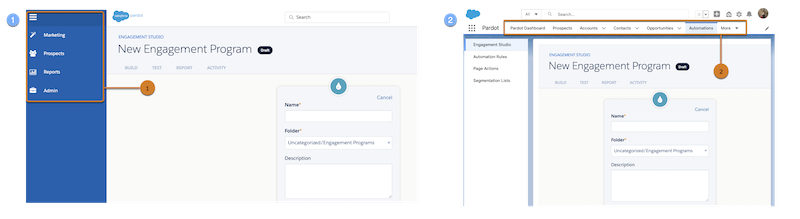
Account Engagement offers two interfaces: a standalone Account Engagement app and an
Account Engagement Lightning app. The interfaces differ in appearance and features, but offer
the same essential functionality. Both experiences require Salesforce SSO to log in and access
the app. The newest features and enhancements are available in Account Engagement Lightning
app.
Required Editions
Available in: All Account
Engagement Editions
The original Account Engagement application (1) that you access at pi.pardot.com is referred
to as standalone Account Engagement.
The Account Engagement Lightning App (2) is a newer interface, and it’s updated with each
Salesforce release. This interface is built on the Salesforce platform and uses Lightning
Experience tabbed navigation. Some benefits include simplified user management with Salesforce
User Sync, drag-and-drop asset builders, and the power of the Salesforce platform.
Tip As you read through Salesforce Help, tasks include two navigation paths. Use
the first bullet if you’re using standalone Account Engagement. Follow the second bullet’s
instructions in Account Engagement Lightning App.
At a Glance
All Account Engagement versions require Salesforce single sign-on and a valid Salesforce
connector. For customers who purchased Account Engagement after February 11, 2019 and have
assigned a business unit, the Salesforce Connector v2 is created automatically.
Interface
Login
Requires Salesforce Lightning
Licenses
Standalone Account Engagement
pi.pardot.com
No
Salesforce Identity user license for access to Account Engagement.
Account Engagement Lightning App
login.salesforce.com
Yes
Sales User, Service User, or CRM User permission set license for full access
to Account Engagement and Salesforce.
Account Engagement permission set license for access to Account Engagement
Lightning App. Doesn’t include full access to campaigns.
The Salesforce Platform user license doesn’t provide access to the Account Engagement
Lightning App.
We use three kinds of cookies on our websites: required, functional, and advertising. You can choose whether functional and advertising cookies apply. Click on the different cookie categories to find out more about each category and to change the default settings.
Privacy Statement
Required Cookies
Always Active
Required cookies are necessary for basic website functionality. Some examples include: session cookies needed to transmit the website, authentication cookies, and security cookies.
Functional Cookies
Functional cookies enhance functions, performance, and services on the website. Some examples include: cookies used to analyze site traffic, cookies used for market research, and cookies used to display advertising that is not directed to a particular individual.
Advertising Cookies
Advertising cookies track activity across websites in order to understand a viewer’s interests, and direct them specific marketing. Some examples include: cookies used for remarketing, or interest-based advertising.