You are here:
Recommender Comparison Example Configuration
Experiments are created, started, and managed on personalization points. For this experiment example, configure two cohorts — one as the control and the other as a variation — using the recommenders that you created and want to test. Each cohort is configured with 50 percent of the defined test population.
- From the App Launcher, search for and select Personalization Points.
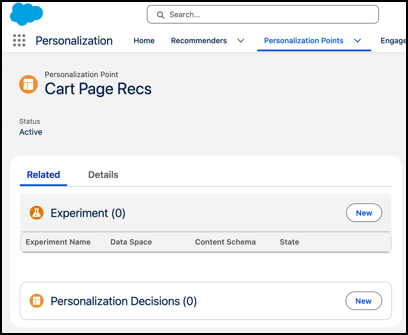
- Locate and open the Cart Page Recs personalization point.
-
From the Related tab, in the Experiment section, click
New.
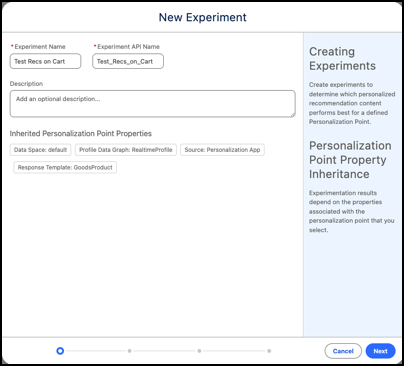
The New Experiment page opens and shows any inherited personalization point properties that the experiment uses when generating results.
-
Enter an experiment name, and an optional description.
Parameter Example Setting Experiment Name Test Recs on Cart Experiment API Name Test_Recs_on_Cart Description Test recommendations for different recommender options. Personalization Point API Name Cart_Page_Recs Description Increase revenue at checkout Personalization Type Recommendations Content Schema Recommendations - Goods Product Maximum Number of Recommendations 3 Source Personalization App Authentication Required Unchecked - Click Next
-
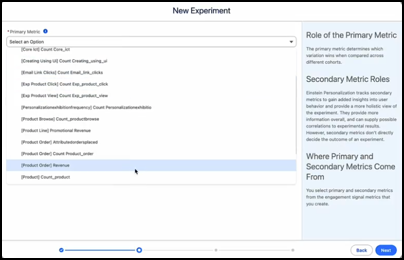
Select the primary metric that you want this experiment to test against.
This metric determines which variation wins across all cohorts defined for the experiment. For this experiment, select the [product order] Revenue from the list.
For information about configuring the Product Order engagement signal, see Example: Product Order. For information about configuring the revenue engagement signal metric for the Product Order engagement signal, see Example Engagement Signal Metrics.
-
(Optional) Select any secondary metrics in the Available window and move them to the
Selected window.
Secondary metrics are tested along with the primary metric.
- Click Next.
-
Click Nextagain to skip the creation of targeting rules.
Targeting rules let you select only a portion of the population for the experiment, instead of using the full population. In this experiment, we let the entire population participate, to gather more data.
-
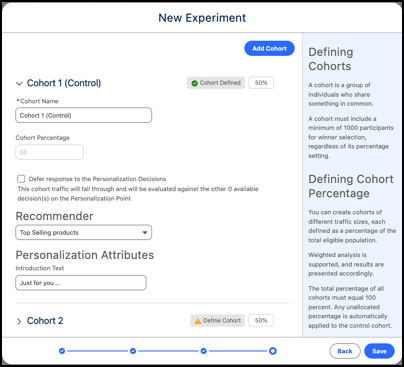
Define the experiment’s control cohort.
In this experiment, define the rule-based recommender that you configured as the control cohort and keep the population value at 50%.
- Specify the introduction text that you want to appear with the recommendations to the control cohort.
-
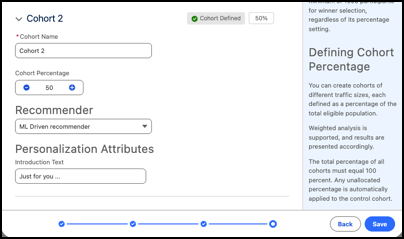
Define a second cohort.
In this experiment, define the objective-based recommender that you configured as the variation cohort and keep the population value at 50%.
- Specify the introduction text that you want to appear with the recommendations to the variation cohort.
- Save your work.
After you save the experiment, it’s automatically placed in a Created state. You can then start the experiment from the Related tab in the personalization point record. See Manage an Experiment for details.
