You are here:
Training a Personalization Recommender
After you create a personalization recommender, it uses Customer 360 data from the selected data graphs to begin training. You can track the training on the recommender record.
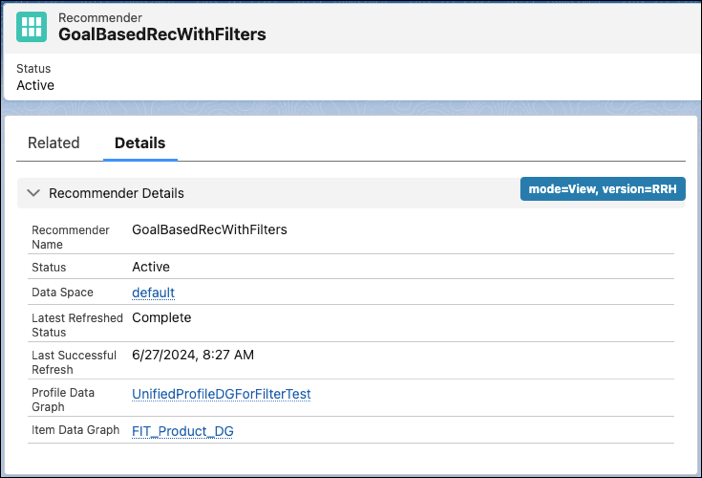
When tracking the recommender status, keep these considerations in mind.
- A recommender must have an Active status for training to occur.
- Training refreshes every 24 hours for all rule-based recommenders, and for all active, objective-based recommenders.
- A recommender is trained using the Data 360 data graphs that you select. The selected data space determines which data graphs you can choose when creating a recommender.
- Latest Refresh Status indicates the training status for the recommender.
Latest Refresh Status Definition Processing Indicates that a recommender is undergoing training. Complete Indicates that the recommender has completed a training cycle. Failure Indicates that Salesforce Personalization encountered a problem while training the recommender. The training will take place again within 24 hours. If this status persists for more than two training cycles, contact Salesforce Customer Support.
Personalization continues to use the last successful training refresh until it’s replaced by a new successful training refresh.
- Last Successful Refresh shows the date and time that the recommender completed training or a training refresh. You can use the recommender when configuring personalization points after at least one refresh is successful.
Did this article solve your issue?
Let us know so we can improve!
