
You are here:
Configure Item Data Graph for the Maximize Revenue with Promotion Recommender
When configuring an item data graph for use with the Maximize Revenue with Promotions recommender, make sure that you include these related objects and fields.
To create a near real-time item data graph, use the instructions in Create a Data Graph.
- If you are defining promotions within Salesforce, deploy the data streams from the Loyalty Management data bundle. Otherwise, create your own data streams, so that your content maps to the Promotion DMO.
- Create the data graph and select the Promotion DMO as the root object.
-
Select every field or relationship that you expect to use as filtering criteria.
For example, to filter out inactive content using IsActive, Start Date, and End Date, add these fields from the Promotion DMO in the data graph.
Object Field Name Field API Name Required? Promotions Promotion Id ssot__Id__cYes Name ssot__Name__cOptional. Use this field to hold a promotion title. Promotional Message ssot__PromotionalMessage__cOptional. Use this field for a long promotion description. Start Date ssot__StartDate__cOptional. Use this field to store the start date of a promotion. You can use this field along with the Is After Current DateTimeoperator in Recommendation filters to prevent an offer from showing until its start date.End Date ssot__EndDate__cOptional. Use this field to indicate an expiration date. You can use this field with the Is Before Current DateTimeoperator in Recommendation filters to prevent an offer from showing after its end date.PromotionMarketSegments relationship ssot__PromotionMarketSegments__cOptional. Use this field to define eligibility criteria of a promotion that uses a Data 360 segment. -
To apply advanced filtering against promotions, such as replicating promotion
eligibility criteria defined in Loyalty Management or elsewhere, add the related objects
and fields to your item data graph.
These related objects and fields can then be used as criteria for recommendation filters. For example, to filter recommendations based on segment eligibility, include the PromotionMarketSegments relationship field along with the Promotion Market Segment and Market Segment DMOs in the item data graph. This configuration establishes a clear DMO relationship–Promotion > Promotion Market Segment > Market Segment. For more examples on eligibility criteria and how to use recommendation filters to limit visibility, see Example Filters for Promotion Eligibility Criteria.
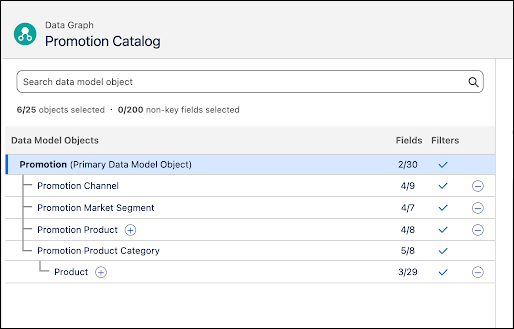
Here’s a sample of how an item data graph with advanced recommendation filter can look:
- To review the structure of the JSON blob, click Preview.
- Save your item data graph.