You are here:
Configure Profile Data Graph for the Maximize Revenue with Promotion Recommender
To use the Maximize Revenue with Promotions recommender, make sure that you include these related objects and fields to capture product and promotion engagement data.
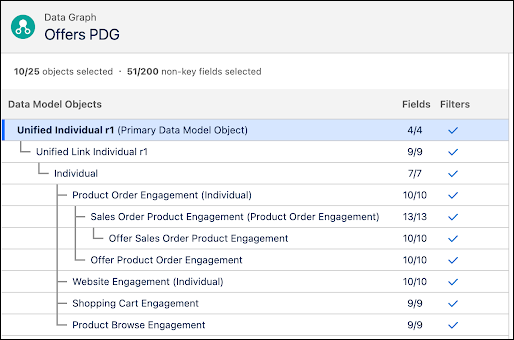
To create a profile data graph, use the instructions in Create a Data Graph, but select the fields and objects listed here.
- Select Unified Link Individual, and click + to add it.
- Select Individual, and click +.
- Add Product Browse Engagement, Product Order Engagement, Shopping Cart Engagement, and Website Engagement to the data graph.
- (Optional) Next to Shopping Cart Engagement, click + and select Shopping Cart Product Engagement.
- Next to Product Order Engagement, click + and select Sales Order Product Engagement and Offer Product Order Engagement.
- Next to Sales Order Product Engagement, click + and select Offer Sales Order Product Engagement.
- (Optional) To include segment membership in filter criteria, look for Unified Individual, click + and select Unified Individual - Latest.
-
Select these related objects, and add the required fields.
Related Object Field Name Field API Name Product Browse Engagement Created Date ssot__CreatedDate__cProduct Id ssot__ProductId__cIndividual ID ssot__IndividualId__cProduct Order Engagement Created Date ssot__CreatedDate__cIndividual ID ssot__IndividualId__cAdjusted Total Product Amount ssot__AdjustedTotalProductAmount__cSales Order Product Engagement Created Date ssot__CreatedDate__cProduct ssot__ProductId__cShopping Cart Engagement Created Date CreatedDate__cProduct Product__cIndividual ID ssot__IndividualId__cOffer Product Order Engagement Promotion PromotionId__cOfferSalesOrderProductEngagement Promotion PromotionId__cWebsite Engagement Created Date ssot__CreatedDate__cIndividual ID ssot__IndividualId__cPromotion ID ssot__PromotionId__cHere's a sample profile data graph:
- In the profile data graph, add the direct or related attributes that you want to use for decision targeting or recommendation filters.
- Add the Data 360 segments or insights that you want to use when making targeting decisions.
- To review the structure of the JSON blob, click Preview.
- Save and build the data graph.

Did this article solve your issue?
Let us know so we can improve!
