
You are here:
Action Link Templates
Create action link templates in Setup so that you can instantiate action link groups with common properties from Connect REST API or Apex. You can package templates and distribute them to other Salesforce orgs.
Required Editions
| Available in: Salesforce Classic (not available in all orgs) and Lightning Experience |
| Available in: all editions except Personal and Starter |
An action link is a button on a feed element. Clicking an action link can take a user to a Web page, initiate a file download, or invoke an API call to Salesforce or to an external server. An action link includes a URL and an HTTP method, and can include a request body and header information, such as an OAuth token for authentication. Use action links to integrate Salesforce and third-party services into the feed so that users can drive productivity and accelerate innovation.
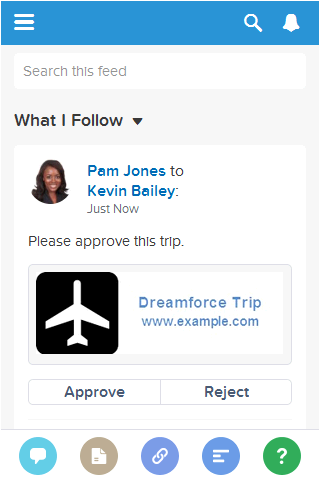
In this example, Approve and Reject are action links that make API calls to the REST API of a fictional travel website to approve or reject an itinerary. When Pam created the itinerary on the travel website, the travel website made a Connect REST API request to post the feed item with the action links to Pam’s manager Kevin so that he can approve or reject the itinerary.

- Design Action Link Templates
Before you create a template, consider which values you want to set in the template and which values you want to set with binding variables when you instantiate action link groups from the template. - Create Action Link Templates
Create action link templates in Setup so that you can instantiate action link groups with common properties from Connect REST API or Apex. You can package templates and distribute them to other Salesforce orgs. - Edit Action Link Templates
You can edit all fields on an unpublished action link group template and on its associated action link templates. - Delete Action Link Group Templates
When you delete an action link group template, you delete its associated action link templates and all action link groups that have been instantiated from the templates. Deleted action link groups disappear from any feed elements they've been associated with. - Package Action Link Templates
Package action link templates to distribute them to other Salesforce organizations.
