If your high-volume community or site users don’t have the expected access to data, work
through these steps to identify and fix the problem. High-volume users don’t have roles and are
limited in what features can be used to grant them access.
Required Editions
Available in: both Salesforce Classic and
Lightning Experience
The available user and data management options vary according to which Salesforce
edition you have.
User Permissions Needed
To access features or complete tasks mentioned in this topic:
See the related Help documentation.
Note High-volume users include the External Apps, Customer Community, High Volume Customer
Portal, and Authenticated Website license types. For more information, see About High-Volume Community or Site
Users.
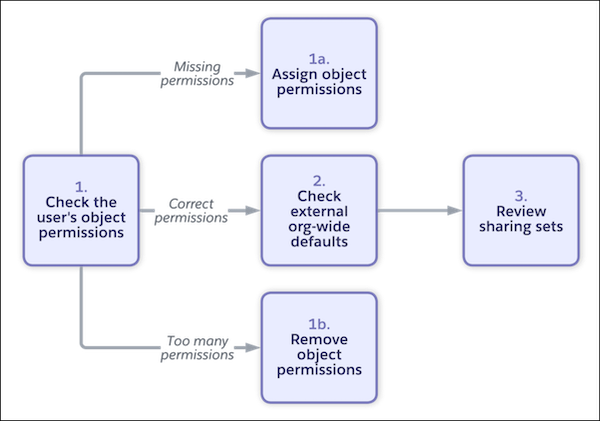
Check if the user has the necessary permissions. Go to the user’s detail page in Setup, and
click View Summary. Review the user’s assigned object, field, and user
permissions. Keep in mind what is available given the user’s license.
Missing permissions: Give the user the required permissions. We recommend that you use
permission sets and permission set groups to assign permissions. When possible, reuse
existing permission sets and permission set groups, rather than creating new ones tailored to
a specific user. However, make sure that you don’t assign more permissions than the user
needs.
Too many permissions: If you determine the user has permissions that they don’t need,
click the permission's row-level action, and then click Access Granted
By to see which profile, permissions sets, or permission set groups are granting
this access. You can change the user’s profile or remove their permission set or permission
set group assignments. You can also modify the included permissions, but doing so affects all
users assigned the same profile, permission set, or permission set group.
Correct permissions: Move to the next step. This issue involves record access, not
permissions.
Check the external organization-wide default sharing settings for the object on the Sharing
Settings Setup page. Keep in mind that they must be more secure than internal default
settings.
Review your sharing sets on the Digital Experiences > Settings page. Make sure that the
correct profiles are selected and the access mapping is configured correctly.
Did this article solve your issue?
Let us know so we can improve!
Loading
Salesforce Help | Article
Cookie Consent Manager
Cookie Consent Manager
General Information
Required Cookies
Functional Cookies
Advertising Cookies
General Information
We use three kinds of cookies on our websites: required, functional, and advertising. You can choose whether functional and advertising cookies apply. Click on the different cookie categories to find out more about each category and to change the default settings.
Privacy Statement
Required Cookies
Always Active
Required cookies are necessary for basic website functionality. Some examples include: session cookies needed to transmit the website, authentication cookies, and security cookies.
Functional Cookies
Functional cookies enhance functions, performance, and services on the website. Some examples include: cookies used to analyze site traffic, cookies used for market research, and cookies used to display advertising that is not directed to a particular individual.
Advertising Cookies
Advertising cookies track activity across websites in order to understand a viewer’s interests, and direct them specific marketing. Some examples include: cookies used for remarketing, or interest-based advertising.