Before you change the width and vertical alignment of screen components, be mindful
that the style settings aren't responsive to screen size. Also understand how to lay out
components of different heights and when to use sections and blank Display Text
components.
Screen element style customizations don’t appear when you open a screen flow on a record
page using a quick action. However, these flows still support style customization for
individual screen components.
Flow screen components inherit styling and layout from the hosting site. As a result,
the same screen flow can look different on an Aura Experience Cloud site than on a
Lightning Web Runtime site. However, the information shown and the underlying
functionality are identical across sites.
Width and Vertical Alignment
Component width and vertical alignment aren't responsive to screen size. For example, if
you set your component width to 3 of 12, it stays at that width even on full-sized
screens.
To move components to the next line on the screen, either add them to their own sections
or use blank Display Text components.
When you apply width and vertical alignment settings to a Repeater component, the
settings apply to the Repeater instance, not to the entire Repeater container.
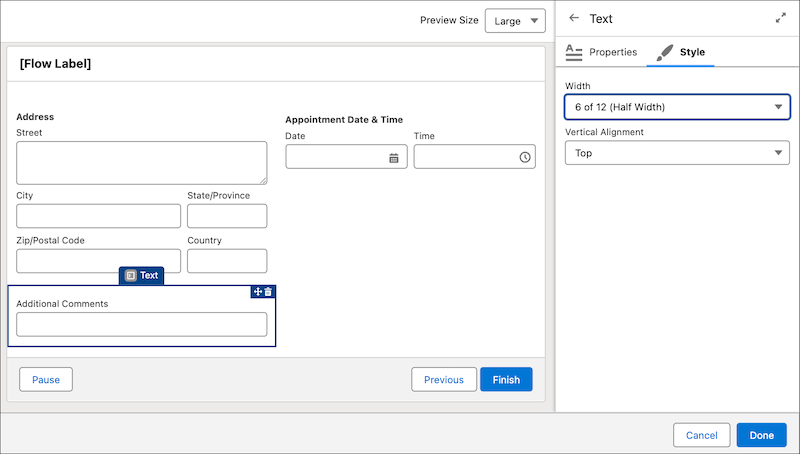
If a component is taller than the components next to it, shorter components don't stack
vertically. Instead, the shorter components move to the next row. For example, after
arranging the Address and Date & Time components side by side, the next Text component
appears below the Address component.
We use three kinds of cookies on our websites: required, functional, and advertising. You can choose whether functional and advertising cookies apply. Click on the different cookie categories to find out more about each category and to change the default settings.
Privacy Statement
Required Cookies
Always Active
Required cookies are necessary for basic website functionality. Some examples include: session cookies needed to transmit the website, authentication cookies, and security cookies.
Functional Cookies
Functional cookies enhance functions, performance, and services on the website. Some examples include: cookies used to analyze site traffic, cookies used for market research, and cookies used to display advertising that is not directed to a particular individual.
Advertising Cookies
Advertising cookies track activity across websites in order to understand a viewer’s interests, and direct them specific marketing. Some examples include: cookies used for remarketing, or interest-based advertising.