Loading
Ongoing maintenance for Salesforce HelpRead More
Automate Your Business Processes
Table of Contents
Select Filters

          No results
          No results
          Here are some search tips

          Check the spelling of your keywords.
          Use more general search terms.
          Select fewer filters to broaden your search.

          Search all of Salesforce Help
          Element Error Rate in Flows

          Element Error Rate in Flows

          Several types of flows automate tasks in the background. As a result, if an error occurs, it can be some time before you notice that anything is wrong with your business process. See which flows need attention at a glance with the Element Error Rate field. This field shows a green success icon for healthy flows and a yellow warning icon for unhealthy flows. Learn how Salesforce calculates the error rate and which metrics it uses in the calculation.
          Required Editions

          Available in: Lightning Experience
          View supported editions.

          The element error rate is the percentage of flow elements used during the last flow occurrence that resulted in errors. Flows with a 0% error rate have no errors and show a green icon. Flows with any error rate from 1% to 100% show a yellow icon indicating a need for investigation. This field is visible on the standard Flows list view and on individual flow record pages.

          Element Runs

          The number of elements activated during the last flow occurrence, which isn't the same as the total number of elements in the flow. To see the number of activated elements, hover over the Element Error Rate field or add the Element Runs field to a list view.

          Element Errors

          The number of elements that resulted in errors during the last flow occurrence. To see the number, hover over the Element Error Rate field or add the Element Errors field to a list view.

          Flow Occurrences

          Each time a flow runs, it creates a flow occurrence. Depending on the flow, a flow occurrence can consist of several flow interviews. A flow that runs weekly on 50 records has one flow occurrence and 50 flow interviews each week.

          Example of How the Element Error Rate Is Calculated

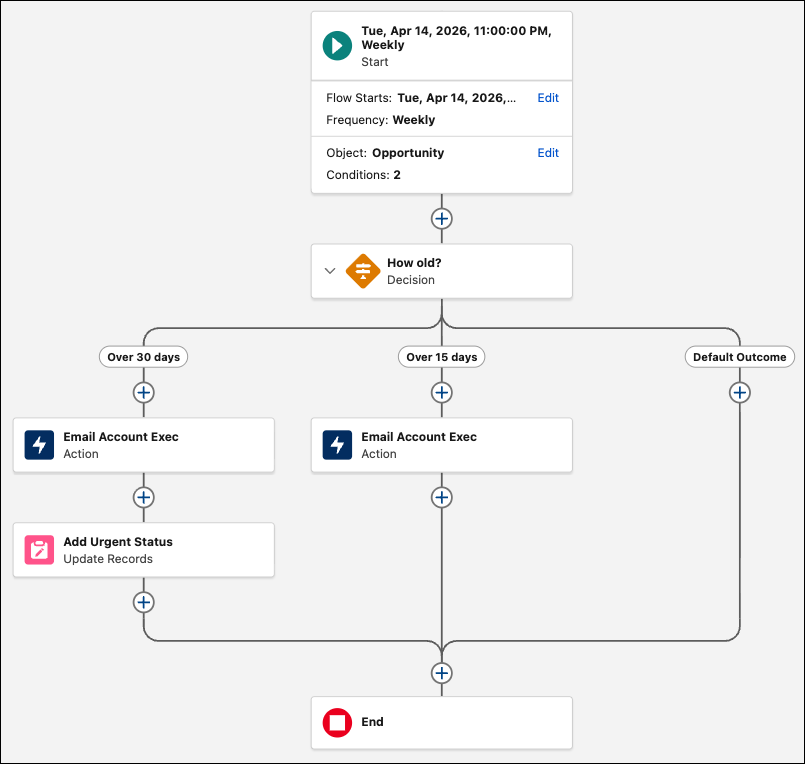
          This flow has a Decision element that splits three possible ways.

          A schedule-triggered flow with three decision options.

          If this flow goes along the Over 30 days path, it runs the Decision, Action, and Update Records elements for a total of three elements. On the Over 15 days path, it runs two elements, and on the Default Outcome path, it runs only one element.

          Suppose that this flow runs the Over 30 days path, but encounters an error during the Update Records element. The flow now has one element error and three elements run, causing the element error rate to be 1/3 or 33%.

          The flow runs weekly on any record that is still active, and on a given run, the flow finds 100 eligible records. Of the flow interviews created for those records:

          • 15 run the Over 30 days path, 5 of which encounter an error at the Update Records element, totaling 45 elements run and five errors.
          • 45 run the Over 15 days path, 10 of which encounter an error at the Action element, totaling 30 elements run and 10 errors.
          • 40 run the Default Outcome path, but there are 5 that encounter an error at the Decision element, totaling 40 elements run and five errors.

          In this example, the element error rate for the entire flow occurrence is 115 elements run with 20 errors, or 17%. This percentage is the number shown in the Element Error Rate field.

           
          Loading
          Salesforce Help | Article
