
You are here:
Debug Log Details
A debug log includes a header, execution units, code units, log lines, and other log data.
Required Editions
| Available in: Salesforce Classic (not available in all orgs) and Lightning Experience |
| Available in: Enterprise, Performance, Unlimited, Developer, and Database.com Editions |
| User Permissions Needed | |
|---|---|
| To view, retain, and delete debug logs: | View All Data |
After you generate a debug log, the type and amount of information listed depends on the filter values you set for the user. However, the format for a debug log is always the same.

The header contains execution units, code units, log lines, and additional log information.
Execution Units
An execution unit is equivalent to a transaction. It contains everything that occurred
within the transaction. EXECUTION_STARTED and EXECUTION_FINISHED delimit an execution unit.
Code Units
A code unit is a discrete unit of work within a transaction. For example, a trigger is one
unit of code, as is a webservice method or a
validation rule.
CODE_UNIT_STARTED and CODE_UNIT_FINISHED delimit units of code. Units of work can embed other units of
work. For example:
EXECUTION_STARTED
CODE_UNIT_STARTED|[EXTERNAL]execute_anonymous_apex
CODE_UNIT_STARTED|[EXTERNAL]MyTrigger on Account trigger event BeforeInsert for [new]|__sfdc_trigger/MyTrigger
CODE_UNIT_FINISHED <-- The trigger ends
CODE_UNIT_FINISHED <-- The executeAnonymous ends
EXECUTION_FINISHED
Units of code include, but are not limited to, the following:
- Triggers
- Workflow invocations and time-based workflow
- Validation rules
- Approval processes
- Apex lead convert
@futuremethod invocations- Web service invocations
executeAnonymouscalls- Visualforce property accesses on Apex controllers
- Visualforce actions on Apex controllers
- Execution of the batch Apex
startandfinishmethods, and each execution of theexecutemethod - Execution of the Apex
System.Schedule executemethod - Incoming email handling
Log Lines
Log lines are included inside units of code and indicate which code or rules are being executed. Log lines can also be messages written to the debug log. For example:
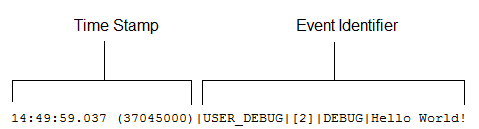
Log lines are made up of a set of fields, delimited by a pipe (|). The format is:
- timestamp: Consists of the time when the event occurred and a value between parentheses. The time is in the user’s time zone and in the format HH:mm:ss.SSS. The value in parentheses represents the time elapsed in nanoseconds since the start of the request. The elapsed time value is excluded from logs reviewed in the Developer Console when you use the Execution Log view. However, you can see the elapsed time when you use the Raw Log view. To open the Raw Log view, from the Developer Console’s Logs tab, right-click the name of a log and select Open Raw Log.
- event identifier: Specifies the event that triggered the debug log entry
(such as
SAVEPOINT_RESETorVALIDATION_RULE).Also includes additional information logged with that event, such as the method name or the line and character number where the code was executed. If a line number can’t be located,
[EXTERNAL]is logged instead. For example,[EXTERNAL]is logged for built-in Apex classes or code that’s in a managed package.For some events (
CODE_UNIT_STARTED,CODE_UNIT_FINISHED,VF_APEX_CALL_START,VF_APEX_CALL_END,CONSTRUCTOR_ENTRY, andCONSTRUCTOR_EXIT), the end of the event identifier includes a pipe (|) followed by a typeRef for an Apex class or trigger.For a trigger, the typeRef begins with the SFDC trigger prefix
__sfdc_trigger/. For example,__sfdc_trigger/YourTriggerNameor__sfdc_trigger/YourNamespace/YourTriggerName.For a class, the typeRef uses the format
YourClass,YourClass$YourInnerClass,orYourNamespace/YourClass$YourInnerClass.
More Log Data
In addition, the log contains the following information.
- Cumulative resource usage is logged at the end of many code units. Among these code
units are triggers,
executeAnonymous, batch Apex message processing,@futuremethods, Apex test methods, Apex web service methods, and Apex lead convert. - Cumulative profiling information is logged once at the end of the transaction and contains information about DML invocations, expensive queries, and so on. “Expensive” queries use resources heavily.
- The version of the API used during the transaction.
- The log category and level used to generate the log. For example:
66.0 APEX_CODE,DEBUG;APEX_PROFILING,INFO;CALLOUT,INFO;DB,INFO;SYSTEM,DEBUG;VALIDATION,INFO;VISUALFORCE,INFO;
WORKFLOW,INFO
In this example, the API version is 66.0, and the following debug log categories and levels have been set.
| Apex Code | DEBUG |
| Apex Profiling | INFO |
| Callout | INFO |
| Database | INFO |
| System | DEBUG |
| Validation | INFO |
| Visualforce | INFO |
| Workflow | INFO |

37.0 APEX_CODE,FINEST;APEX_PROFILING,INFO;CALLOUT,INFO;DB,INFO;SYSTEM,DEBUG;
    VALIDATION,INFO;VISUALFORCE,INFO;WORKFLOW,INFO
Execute Anonymous: System.debug('Hello World!');
16:06:58.18 (18043585)|USER_INFO|[EXTERNAL]|005D0000001bYPN|devuser@example.org|
    Pacific Standard Time|GMT-08:00
16:06:58.18 (18348659)|EXECUTION_STARTED
16:06:58.18 (18383790)|CODE_UNIT_STARTED|[EXTERNAL]|execute_anonymous_apex
16:06:58.18 (23822880)|HEAP_ALLOCATE|[72]|Bytes:3
16:06:58.18 (24271272)|HEAP_ALLOCATE|[77]|Bytes:152
16:06:58.18 (24691098)|HEAP_ALLOCATE|[342]|Bytes:408
16:06:58.18 (25306695)|HEAP_ALLOCATE|[355]|Bytes:408
16:06:58.18 (25787912)|HEAP_ALLOCATE|[467]|Bytes:48
16:06:58.18 (26415871)|HEAP_ALLOCATE|[139]|Bytes:6
16:06:58.18 (26979574)|HEAP_ALLOCATE|[EXTERNAL]|Bytes:1
16:06:58.18 (27384663)|STATEMENT_EXECUTE|[1]
16:06:58.18 (27414067)|STATEMENT_EXECUTE|[1]
16:06:58.18 (27458836)|HEAP_ALLOCATE|[1]|Bytes:12
16:06:58.18 (27612700)|HEAP_ALLOCATE|[50]|Bytes:5
16:06:58.18 (27768171)|HEAP_ALLOCATE|[56]|Bytes:5
16:06:58.18 (27877126)|HEAP_ALLOCATE|[64]|Bytes:7
16:06:58.18 (49244886)|USER_DEBUG|[1]|DEBUG|Hello World!
16:06:58.49 (49590539)|CUMULATIVE_LIMIT_USAGE
16:06:58.49 (49590539)|LIMIT_USAGE_FOR_NS|(default)|
  Number of SOQL queries: 0 out of 100
  Number of query rows: 0 out of 50000
  Number of SOSL queries: 0 out of 20
  Number of DML statements: 0 out of 150
  Number of DML rows: 0 out of 10000
  Maximum CPU time: 0 out of 10000
  Maximum heap size: 0 out of 6000000
  Number of callouts: 0 out of 100
  Number of Email Invocations: 0 out of 10
  Number of future calls: 0 out of 50
  Number of queueable jobs added to the queue: 0 out of 50
  Number of Mobile Apex push calls: 0 out of 10

16:06:58.49 (49590539)|CUMULATIVE_LIMIT_USAGE_END

16:06:58.18 (52417923)|CODE_UNIT_FINISHED|execute_anonymous_apex
16:06:58.18 (54114689)|EXECUTION_FINISHED