
You are here:
Overlaying Apex Code and SOQL Statements
Use the Developer Console to overlay diagnostics that run when Apex code executes at a checkpoint, without changing any code.
When troubleshooting a runtime issue, you might want information about the state of a variable or the state of the database. You might also want to create a specific condition in which to test your code. The Developer Console allows you to overlay Apex code and SOQL statements that run when code executes at a checkpoint.
- Set checkpoints and execute your code, then go to the Checkpoints tab.
- Select a checkpoint and click Edit Properties.
-
Select SOQL or Apex Code. To run the diagnostic
code without generating a heap dump at the checkpoint, deselect Dump
Heap.
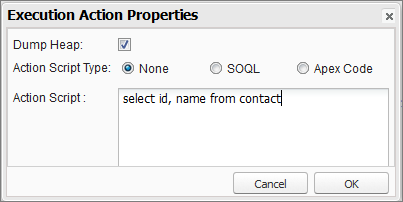
-
Enter SOQL or Apex code in the Action Script box and click
OK.
 Note
NoteYou can’t refer to local objects because an anonymous block is a new stack frame. Refer to static objects or create new objects. Also, you can't use bind variables in SOQL queries used in overlays.
The results of the overlayed code will appear on a separate Query Results or Apex Execution Results tab in the Checkpoint Inspector.
-1 indicates that a field is not applicable.